
很多人可能想隐藏掉Chrome书签栏上的应用程序图标按钮,但是怎样可以去掉它呢?
其实非常简单,根本不需要去装扩展工具或者修改注册表,你只需要:
1,在书签栏或者应用程序图标上点击鼠标右键。
2,点击显示应用快捷方式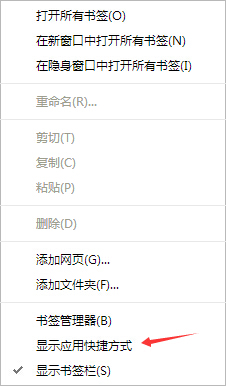
此时图标如果是显示的,就会隐藏,如果隐藏的话,也可以重新显示出来。
如果你选择了账户同步功能,那么在其他设备上,会呈现相同的设置。
去掉应用程序图标显示后,仍然可以在地址栏输入chrome://apps来打开应用程序功能
一个很简单的小技巧,但是似乎很多人并不知道。
很多人可能想隐藏掉Chrome书签栏上的应用程序图标按钮,但是怎样可以去掉它呢? 其实非常简单,根本不需要去装扩展工具或者修改注册表,你只需要: 1,在书签栏或者应用程序图标上点击鼠

很多人可能想隐藏掉Chrome书签栏上的应用程序图标按钮,但是怎样可以去掉它呢?
其实非常简单,根本不需要去装扩展工具或者修改注册表,你只需要:
1,在书签栏或者应用程序图标上点击鼠标右键。
2,点击显示应用快捷方式
此时图标如果是显示的,就会隐藏,如果隐藏的话,也可以重新显示出来。
如果你选择了账户同步功能,那么在其他设备上,会呈现相同的设置。
去掉应用程序图标显示后,仍然可以在地址栏输入chrome://apps来打开应用程序功能
一个很简单的小技巧,但是似乎很多人并不知道。
Keep up with browser releases, security fixes, Android updates, and feature rollouts across the Chrome ecosystem.
Google has promoted Chrome 148 to the stable channel for Windows, macOS and Linux, beginning a staged rollout that users will receive over the coming days or weeks. The release is important not only because it advances Chrome's feature...
Read articleGoogle has released a follow-up stable update for Chrome 148 on desktop, moving the browser to version 148.0.7778.167/168 for Windows and macOS and 148.0.7778.167 for Linux. The update is rolling out gradually, but it is notable because it...
Read articleGoogle has started rolling out Chrome 148 for Android, bringing version 148.0.7778.167 to mobile users through Google Play over several days. The release is described as a stability and performance update, but it also matters because...
Read article