
Download 69.0.3497.81 from the Chrome Stable for Windows 64-bit
Download Google Chrome 69.0.3497.81 with the branch, platform, release date, and file size shown clearly on the same page.
What users usually want to know first
What changed in Chrome 69.0.3497.81
Google Chrome 69.0.3497.81 is available here as part of the Windows 64-bit Stable archive. Use this release page when you want the exact version, the current package details, and quick access to the correct installer.
CSS Scroll Snap
CSS Scroll Snap allows you to create smooth, slick, scroll experiences, by declaring scroll snap positions that tell the browser where to stop after each scrolling operation. This is super helpful for image carousels, or paginated sections where you want the user to scroll to a specific point.
For an image carousel, I'd add scroll-snap-type: x mandatory; to the scroll container, and scroll-snap-align: center; to each image. Then, as the user scrolls through the carousel, each image will be smoothly scrolled into the perfect position.
CSS Scroll Snapping works well, even when the snap targets have different sizes or when they are larger than the scroller! Check out the post Well-Controlled Scrolling with CSS Scroll Snap for more details and samples you can try!
Display cutouts (aka notches)
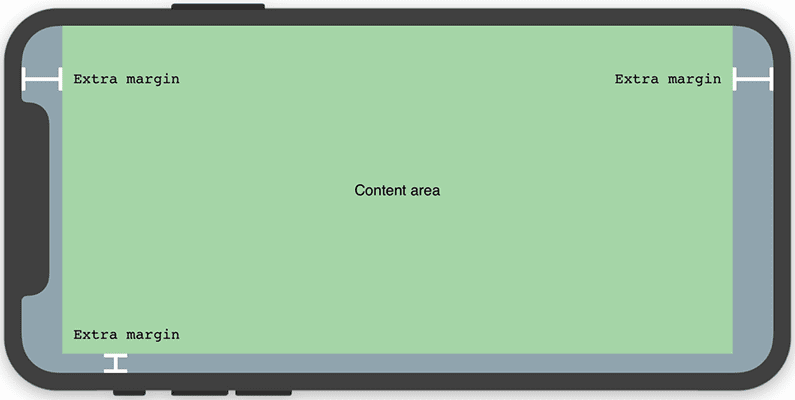
There are an increasing number of mobile devices being released with a display cutout, sometimes called a notch. To deal with that, browsers add a little bit of extra margin to your page so the content isn't obscured by the notch.
But what if you want to use that space?
With CSS environment variables and the viewport-fit meta tag, now you can. For example, to tell the browser to expand into the display cutout area, set the viewport-fit property, in the viewport meta tag to cover.
You can then use the safe-area-inset-* CSS environment variables to layout your content.
There's a great post on the WebKit blog about Designing Websites for iPhone X, or check out the explainer for more details.
Web Locks API
The Web Locks API allows you to asynchronously acquire a lock, hold it while work is performed, then release it. While the lock is held, no other script in the origin can acquire the same lock, helping to coordinate the usage of shared resources.
For example, if a web app running in multiple tabs wants to ensure that only one tab is syncing to the network, the sync code would attempt to acquire a lock named network_sync_lock.
The first tab to acquire the lock will sync the data to the network. If another tab tries to acquire the same lock, it'll be queued. Once the lock has been released, the next queued request will be granted the lock, and execute.
MDN has a great Web Locks primer and includes a more in-depth explanation and lots of examples. Or dive in deeper and check out the spec.
And more!
These are just a few of the changes in Chrome 69 for developers, of course, there's plenty more.

- From the CSS4 spec, you can now create color transitions around the circumference of a circle, using conic gradients. Lea Verou has a CSS
conic-gradient()polyfill that you can use, and the page includes a whole bunch of really cool community submitted samples. - There's a new
toggleAttribute()method on elements that toggles the existence of an attribute, similar toclassList.toggle(). - JavaScript arrays are getting two new methods:
flat()andflatMap(). They return a new array with all sub-array elements smooshed into it. - And
OffscreenCanvasmoves work off the main thread in to a worker, helping to eliminate performance bottlenecks.
Easter eggs
Did you find all of the easter eggs in the video?
- The Chrome comic book
- Chromercise bands
- Potato cannon
- Pete Monster
- Wooden dino from CDS 2017
A special thanks to all the people who have helped to make the 28 episodes of New in Chrome happen. Every single one of these people are awesome!
Want to see how far New in Chrome has come since our first episode? Check out this fun 30 second progression video that charts our history from our first video to today!
And of course, thank you for watching and providing your comments and feedback! I read all of them, and take your suggestions to heart. These videos have gotten better because of you!
Thanks for watching!
New in Chrome Bloopers
We put together a fun little blooper reel for you to enjoy! After watching it, I've learned a few things:
- When I trip over my words, I make some weird noises.
- I make faces and stick my tongue out.
- I wiggle, a lot.
Want to stay up to date with our videos, then subscribe to our Chrome Developers YouTube channel, and you'll get an email notification whenever we launch a new video.
I'm Pete LePage, and as soon as Chrome 70 is released, I'll be right here to tell you -- what's new in Chrome!
Official source: Official Chrome update
Installation notes
After downloading the package, confirm that the branch and platform match your device before launching the installer or extracting the archive. If you only need a standard everyday browser, Stable is usually the safest choice. If you are testing new behavior, Beta, Dev, and Canary are better fits.
Related release pages
For newer or older builds in the same branch, open the category archive linked above. For different platforms, use the related desktop archives in the sidebar.
Frequently asked questions
These FAQ blocks help the page read like a complete release article instead of a download stub, which is better for trust and better for SEO.
Should I use this release or stay on Stable?
If you just want the safest everyday browsing experience, Stable is usually the right default. Preview branches are better for testing, compatibility checks, and early feature access.
Why show exact version numbers so prominently?
Because exact-version queries are common in English search behavior, especially for QA teams, enterprise users, and people trying to reproduce a bug or environment.
Why keep a full article around the download buttons?
A stronger page body gives users context and gives Google clearer signals about what the release page actually covers.
Where should older releases live?
Older versions belong in the category archive page, with this article template handling exact-version landing pages one release at a time.