
Download 63.0.3239.84 from the Chrome Stable for Windows 64-bit
Download Google Chrome 63.0.3239.84 with the branch, platform, release date, and file size shown clearly on the same page.
What users usually want to know first
What changed in Chrome 63.0.3239.84
Google Chrome 63.0.3239.84 is available here as part of the Windows 64-bit Stable archive. Use this release page when you want the exact version, the current package details, and quick access to the correct installer.
Dynamic module imports
Importing JavaScript modules is super handy, but it's static, you can't import modules based on runtime conditions.
Thankfully, that changes in Chrome 63, with the new dynamic import syntax. It allows you to dynamically load code into modules and scripts at runtime. It can be used to lazy load a script only when it's needed, improving the performance of your application.
Instead of loading your whole application when the user first hits your page, you can grab the resources you need to sign in. Your initial load is small and screaming fast. Then once the user signs in, load the rest, and you're good to go.
Async iterators and generators
Writing code that does any sort of iteration with async functions can be ugly. In fact, it's the core part of my favorite interview coding question.
Now, with async generator functions and the async iteration protocol, consumption or implementation of streaming data sources becomes streamlined, and my coding question becomes much easier.
Async iterators can be used in for-of loops and also to create your own custom async iterators through async iterator factories.
Over-scroll behavior
Scrolling is one of the most fundamental ways to interact with a page, but certain patterns can be tricky to deal with. For example, the browsers pull to refresh feature, where swiping down at the top of the page, does a hard reload.
In some cases, you might want to override that behavior and provide your own experience. That's what Twitter's progressive web app does, when you pull down, instead of reloading the whole the page, it simply adds any new tweets to the current view.
Chrome 63 now supports the CSS overscroll-behavior property, making it easy to override the browser's default overflow scroll behavior.
You can use it to:
- Cancel scroll chaining
- Disable or customize the pull-to-refresh action
- Disable rubber banding effects on iOS
- Add swipe navigations
- And more...
The best part, overscroll-behavior doesn't have a negative effect on your page performance!
Permission UI changes
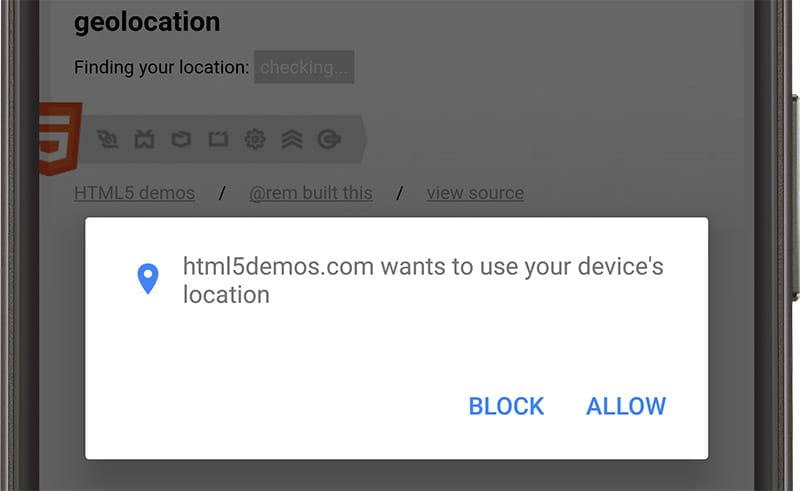
I love web push notifications but I've been really frustrated by the number of sites asking for permission on page load, without any context - and I'm not alone.
90% of all permission requests are ignored or temporarily blocked.
In Chrome 59, we started to address this problem by temporarily blocking a permission if the user dismissed the request three times. Now in m63, Chrome for Android will make permission requests modal dialogs.
Remember, this isn't just for push notifications, this is for all permission requests. If you ask permission at the appropriate time and in context, we've found that users are two and a half times more likely to grant permission!
And more!
These are just a few of the changes in Chrome 63 for developers, of course, there's plenty more.
finallyis now available onPromiseinstances and is invoked after aPromisehas been fulfilled or rejected.- The new Device Memory JavaScript API helps you understand performance constraints by giving you hints about the total amount of RAM on the user's device. You can tailor your experience at runtime, reducing complexity on lower end devices, providing users a better experience with fewer frustrations.
- The
Intl.PluralRulesAPI allows you to build applications that understand pluralization of a given language by indicating which plural form applies for a given number, and language. And can help with ordinal numbers.
Be sure to subscribe to our YouTube channel, and you'll get an email notification whenever we launch a new video.
I'm Pete LePage, and as soon as Chrome 64 is released, I'll be right here to tell you -- what's new in Chrome!
Official source: Official Chrome update
Installation notes
After downloading the package, confirm that the branch and platform match your device before launching the installer or extracting the archive. If you only need a standard everyday browser, Stable is usually the safest choice. If you are testing new behavior, Beta, Dev, and Canary are better fits.
Related release pages
For newer or older builds in the same branch, open the category archive linked above. For different platforms, use the related desktop archives in the sidebar.
Frequently asked questions
These FAQ blocks help the page read like a complete release article instead of a download stub, which is better for trust and better for SEO.
Should I use this release or stay on Stable?
If you just want the safest everyday browsing experience, Stable is usually the right default. Preview branches are better for testing, compatibility checks, and early feature access.
Why show exact version numbers so prominently?
Because exact-version queries are common in English search behavior, especially for QA teams, enterprise users, and people trying to reproduce a bug or environment.
Why keep a full article around the download buttons?
A stronger page body gives users context and gives Google clearer signals about what the release page actually covers.
Where should older releases live?
Older versions belong in the category archive page, with this article template handling exact-version landing pages one release at a time.