
Download 115.0.5790.170 from the Chrome Stable for Windows 64-bit
Download Google Chrome 115.0.5790.170 with the branch, platform, release date, and file size shown clearly on the same page.
What users usually want to know first
What changed in Chrome 115.0.5790.170
Google Chrome 115.0.5790.170 is available here as part of the Windows 64-bit Stable archive. Use this release page when you want the exact version, the current package details, and quick access to the correct installer.
Scroll driven animations
Scroll-driven animations are a common UX pattern on the web. A scroll-driven animation is linked to the scroll position of a scroll container. This means that as you scroll up or down, the linked animation goes forward or backward in direct response.
The following examples demonstrate some use cases. For example you can create reading indicators which move as you scroll:
Scroll-driven animations can also create elements that fade-in as they come into view:
By default, an animation attached to an element runs on the document timeline. Its origin time starts at 0 when the page loads, and starts ticking forward as clock time progresses. This is the default animation timeline and, until now, was the only animation timeline you had access to.
The Scroll-driven Animations Specification defines two new types of timelines that you can use:
- Scroll Progress Timeline: a timeline that is linked to the scroll position of a scroll container along a particular axis.
- View Progress Timeline: a timeline that is linked to the relative position of a particular element within its scroll container.
Here’s a code sample that uses an anonymous Scroll Progress Timeline to create a reading progress indicator fixed to the top of the viewport.
Read scroll-drive animations for all the details and more examples.
Fenced Frames
The Privacy Sandbox is an initiative that aims to create technologies that both protect people's privacy online and give developers tools to build thriving digital businesses.
Many of its proposals aim to satisfy cross-site use cases without third-party cookies or other tracking mechanisms. For example:
- The Protected Audience API: allows for interest-based ad serving in a privacy-preserving manner.
- Shared Storage: allows access to unpartitioned cross-site data in a secure environment.
In order to preserve privacy some of these APIs require a new way to embed content. The solution is called a fenced frame.
Fenced frames work in combination with other Privacy Sandbox proposals to display documents from different storage partitions within a single page.
A fenced frame is a HTML element for embedded content, similar to an iframe. Unlike iframes, a fenced frame limits communication with its embedding context to allow the frame access to cross-site data without sharing it with the embedding context.
Similarly, any first-party data in the embedding context cannot be shared with the fenced frame.
For example, let's say news.example (the embedding context) embeds an ad from shoes.example in a fenced frame. news.example cannot exfiltrate data from the shoes.example ad, and shoes.example cannot learn first-party data from news.example.
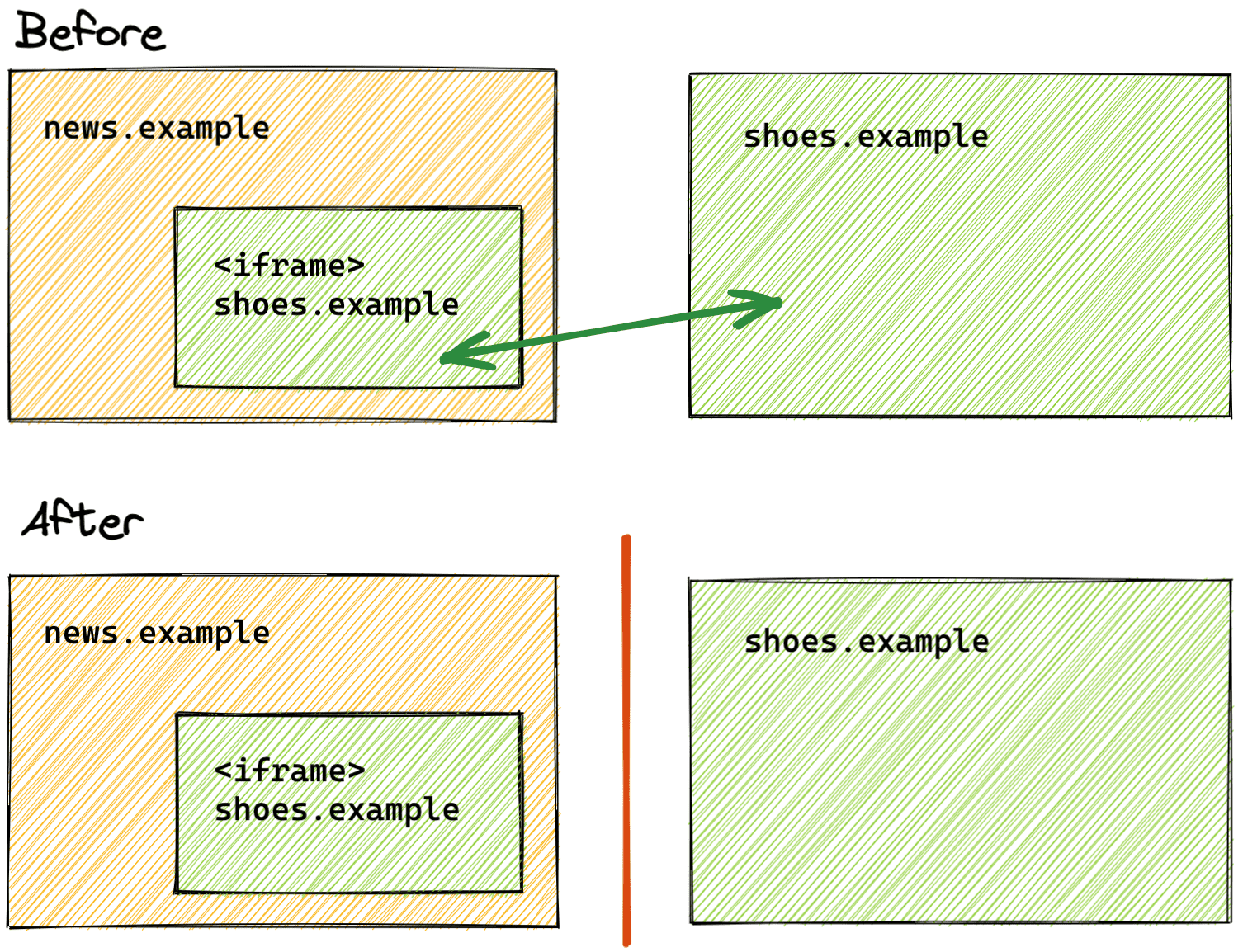
Check out these articles for documentation about Fenced Frames, the Protected Audience API, Shared Storage and more
Topics API
In the past, third-party cookies and other mechanisms have been used to track user browsing behavior across sites to infer topics of interest. These mechanisms are being phased out as part of the Privacy Sandbox initiative.
The Topics API allows a browser to share information with third parties about a user's interests while preserving privacy.
The Topics API enables interest-based advertising (IBA) without tracking the sites a user visits. The browser observes and records topics that appear to be of interest to the user, based on their browsing activity. This information is recorded on the user's device.
For example, the API might suggest the topic "Fiber & Textile Arts" for a user who visits the website knitting.example.
Topics are a signal to help ad tech platforms select relevant ads. Unlike third-party cookies, this information is shared without revealing further information about the user themself or the user's browsing activity.
Read the Privacy Sandbox overview for all the details on the topics taxonomy and using the Topics API
And more!
Of course there’s plenty more.
- The maximum size of a
WebAssembly.Moduleon the main thread increased to 8 megabytes - The CSS
displayproperty now accepts multiple keywords as a value, besides the legacy precomposed keywords. - There is an origin trial for the Compute Pressure API, which offers high-level information about the current state of the device hardware.
Official source: Official Chrome update
Installation notes
After downloading the package, confirm that the branch and platform match your device before launching the installer or extracting the archive. If you only need a standard everyday browser, Stable is usually the safest choice. If you are testing new behavior, Beta, Dev, and Canary are better fits.
Related release pages
For newer or older builds in the same branch, open the category archive linked above. For different platforms, use the related desktop archives in the sidebar.
Frequently asked questions
These FAQ blocks help the page read like a complete release article instead of a download stub, which is better for trust and better for SEO.
Should I use this release or stay on Stable?
If you just want the safest everyday browsing experience, Stable is usually the right default. Preview branches are better for testing, compatibility checks, and early feature access.
Why show exact version numbers so prominently?
Because exact-version queries are common in English search behavior, especially for QA teams, enterprise users, and people trying to reproduce a bug or environment.
Why keep a full article around the download buttons?
A stronger page body gives users context and gives Google clearer signals about what the release page actually covers.
Where should older releases live?
Older versions belong in the category archive page, with this article template handling exact-version landing pages one release at a time.