
Download 104.0.5112.81 from the Chrome Stable for Windows 64-bit
Download Google Chrome 104.0.5112.81 with the branch, platform, release date, and file size shown clearly on the same page.
What users usually want to know first
What changed in Chrome 104.0.5112.81
Google Chrome 104.0.5112.81 is available here as part of the Windows 64-bit Stable archive. Use this release page when you want the exact version, the current package details, and quick access to the correct installer.
Specify a crop area with region capture
getDisplayMedia() makes it possible to create a video stream from the current tab. But, there are times when you don’t want the entire tab, only a small portion of it. Until now, the only way to do that was to manually crop each video frame.
With Region Capture, a web app can define the specific area of the screen it wants to share. For example, Google Slides could allow you to stay in the standard editing view, and share the current slide.
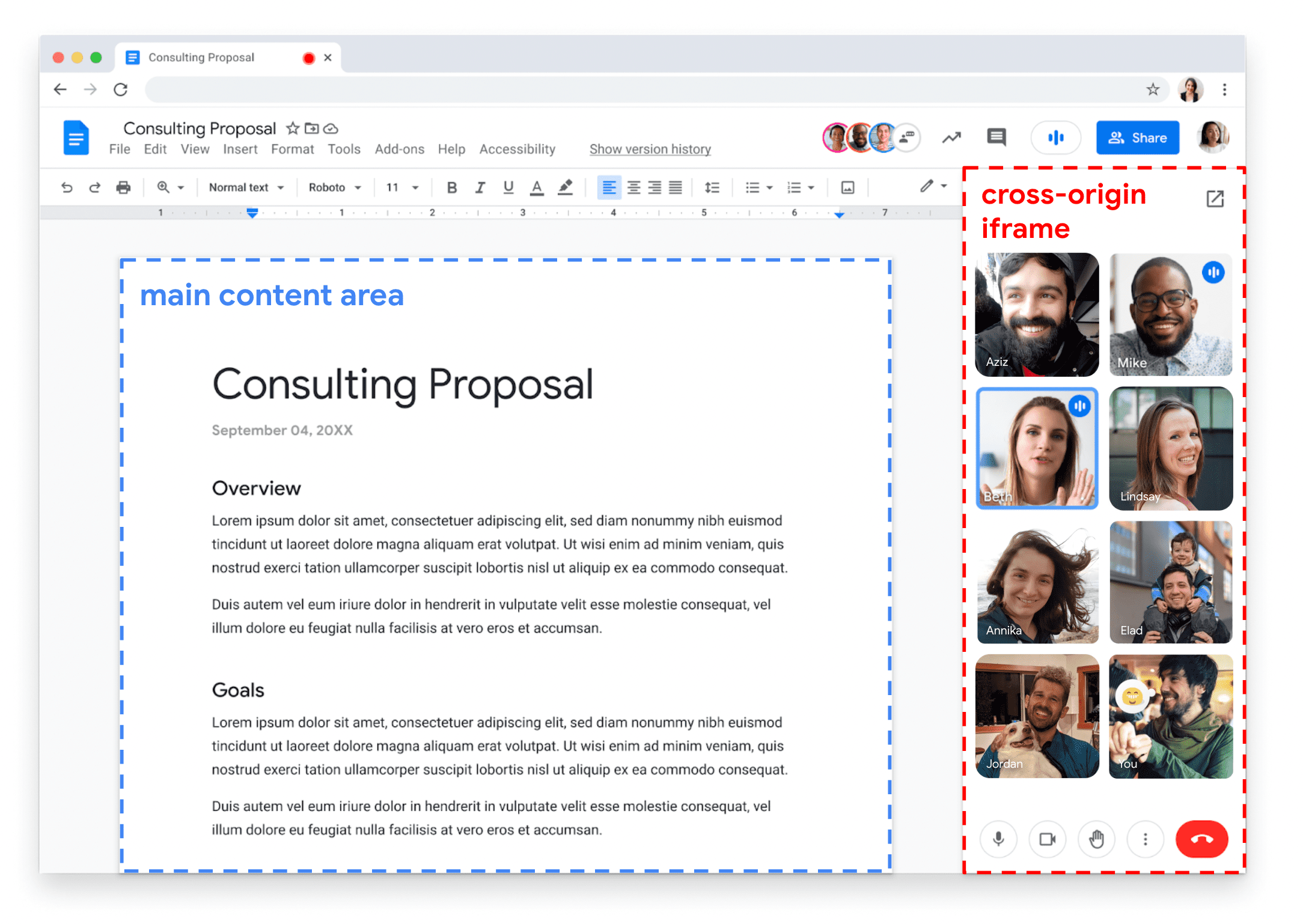
To use it, select the element to share, then create a new CropTarget based on that element. Next, start screen sharing by calling getDisplayMedia(). That prompts the user for permission to share their screen. Then, call track.cropTo() and pass the cropTarget created earlier.
Check out Better tab sharing with Region Capture for more details.
Easier media queries with level 4 syntax and evaluation
Media Queries are critical to responsive design, allowing you to define specific styles for different viewport sizes. But, unless you use them every single day, the syntax can be a little confusing.
Chrome 104 adds support for Media Queries - Level 4 - Syntax and Evaluation, allowing you to write media queries using ordinary mathematical comparison operators.
So instead of something like this to indicate a viewport between 400 and 600 pixels:
It can be written like this:
In addition to making media queries less verbose, the new syntax can be more accurate. The min- and max- queries are inclusive, for example: min-width: 400px tests for a width of 400px or greater. The new syntax allows you to be more explicit about what you mean.
It's already supported in Firefox, and there’s a PostCSS plugin that will re-write the new syntax to the old syntax, ensuring browser compatibility!
Check out Rachel’s article New syntax for range media queries in Chrome 104 for more details.
Shared Element Transitions start new origin trial
Platform specific apps typically have smooth transitions between different views, they look beautiful, they keep the user in context, and they help the experience feel more performant. Whereas on the web, a full navigation can be harsh, and sometimes means a momentary blank screen. For a single page app, it can be better, but transitions are still hard.
Shared Element Transitions, starting a new origin trial in Chrome 104, allows you to provide smooth transitions, regardless of whether the transitions are cross-document (for example in a multi-page app), or intra-document (for example in a single page app).
Here’s a rough example of how transitions work for a single page app. In the navigate function, get the new page content, then check to see if transitions are supported, if not, update the page without a transition. If they are, create a transition() and call start() on it, letting the API know when the DOM change is complete.
I’ve just scratched the surface, so check out Jake’s video Bringing Page Transitions to the Web, or dive into the explainer.
And more!
Of course there's plenty more.
- When cookies are set with an explicit
ExpiresorMax-Ageattribute, the value will now be capped to no more than 400 days. - There are enhancements to the multi-screen window placement API.
- And the
overflow-clip-marginCSS property specifies how far an element's content is allowed to paint before being clipped.
Official source: Official Chrome update
Installation notes
After downloading the package, confirm that the branch and platform match your device before launching the installer or extracting the archive. If you only need a standard everyday browser, Stable is usually the safest choice. If you are testing new behavior, Beta, Dev, and Canary are better fits.
Related release pages
For newer or older builds in the same branch, open the category archive linked above. For different platforms, use the related desktop archives in the sidebar.
Frequently asked questions
These FAQ blocks help the page read like a complete release article instead of a download stub, which is better for trust and better for SEO.
Should I use this release or stay on Stable?
If you just want the safest everyday browsing experience, Stable is usually the right default. Preview branches are better for testing, compatibility checks, and early feature access.
Why show exact version numbers so prominently?
Because exact-version queries are common in English search behavior, especially for QA teams, enterprise users, and people trying to reproduce a bug or environment.
Why keep a full article around the download buttons?
A stronger page body gives users context and gives Google clearer signals about what the release page actually covers.
Where should older releases live?
Older versions belong in the category archive page, with this article template handling exact-version landing pages one release at a time.