
Download 70.0.3538.102 from the Chrome Stable for macOS
Download Google Chrome 70.0.3538.102 with the branch, platform, release date, and file size shown clearly on the same page.
What users usually want to know first
What changed in Chrome 70.0.3538.102
Google Chrome 70.0.3538.102 is available here as part of the macOS Stable archive. Use this release page when you want the exact version, the current package details, and quick access to the correct installer.
Desktop Progressive Web Apps on Windows & Linux
Users can now install Desktop Progressive Web Apps on Windows & Linux!
Once installed, they're launched from the Start menu, and run like all other installed apps, without an address bar or tabs. Service workers ensure that they're fast, and reliably, the app window experience makes them feel like any other installed app.
Getting started isn't any different than what you're already doing today. All of the work you've done for your existing Progressive Web App still applies! If your app meets the standard PWA criteria, Chrome will fire the beforeinstallprompt event. Save the event; then, add some UI (like an install app button) to tell the user your app can be installed. Then, when the user clicks the button, call prompt() on the saved event; Chrome will then show the prompt to the user. If they click add, Chrome will add your PWA to their start menu and desktop.
See my Desktop PWAs post for complete details.
Credential Management API: Public Key Credentials
The Credential Management API makes sign in super simple for users. It allows your site to interact with the browser's credential manager or federated account services like Google and Facebook to sign.
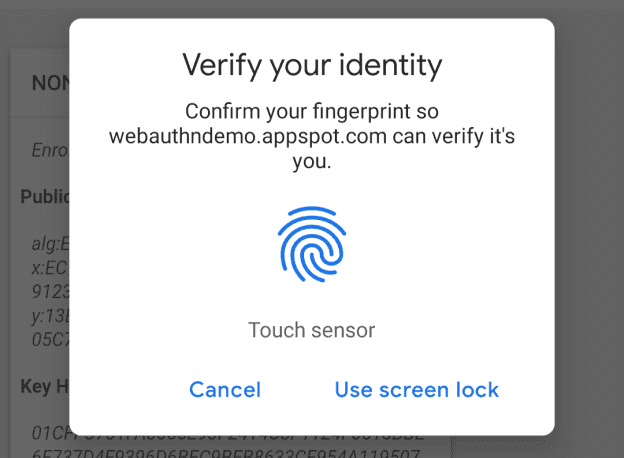
Chrome 70 adds support for a third type of credential: Public Key Credential, which allows web applications to create and use, strong, cryptographically attested, and application-scoped credentials to strongly authenticate users.
I'm pretty excited about it because it allows sites to use my fingerprint for 2-factor authentication. But, it also adds support for additional types of security keys and better security on the web.
Check the Credential Management API docs for more details or give it a try with the WebAuthn Demo and how you can get started!
Named workers
Workers are an easy way to move JavaScript off the main thread and into the background. This is critical to keeping your site interactive, because it means that the main thread won't lock up when it's running an expensive or complex JavaScript computation.


In Chrome 70, workers now have a name attribute, which is specified by an optional argument on the constructor.
This lets you distinguish dedicated workers by name when you have multiple workers with the same URL. You can also print the name in the DevTools console, making it much easier to know which worker you're debugging!
Naming workers is already available in Firefox, Edge, and Safari. See the discussion on GitHub for more details.
And more!
These are just a few of the changes in Chrome 70 for developers, of course, there's plenty more.
- Web Bluetooth is now available in Windows 10, and allows your site to communicate with nearby user-selected Bluetooth devices in a secure and privacy-preserving way.
- Chrome can send intervention and deprecation messages to your servers using the
Report-To HTTPResponse header field or surface them in theReportingObserverinterface. - There are a number of important deprecations you should know about, check the Deprecations and removals in Chrome 70 post for more details.
- And be sure to check out the latest What's new in DevTools post to learn what's new in Chrome DevTools.
Want to stay up to date with our videos, then subscribe to our Chrome Developers YouTube channel, and you'll get an email notification whenever we launch a new video.
I'm Pete LePage, and as soon as Chrome 71 is released, I'll be right here to tell you -- what's new in Chrome!
Official source: Official Chrome update
Installation notes
After downloading the package, confirm that the branch and platform match your device before launching the installer or extracting the archive. If you only need a standard everyday browser, Stable is usually the safest choice. If you are testing new behavior, Beta, Dev, and Canary are better fits.
Related release pages
For newer or older builds in the same branch, open the category archive linked above. For different platforms, use the related desktop archives in the sidebar.
Frequently asked questions
These FAQ blocks help the page read like a complete release article instead of a download stub, which is better for trust and better for SEO.
Should I use this release or stay on Stable?
If you just want the safest everyday browsing experience, Stable is usually the right default. Preview branches are better for testing, compatibility checks, and early feature access.
Why show exact version numbers so prominently?
Because exact-version queries are common in English search behavior, especially for QA teams, enterprise users, and people trying to reproduce a bug or environment.
Why keep a full article around the download buttons?
A stronger page body gives users context and gives Google clearer signals about what the release page actually covers.
Where should older releases live?
Older versions belong in the category archive page, with this article template handling exact-version landing pages one release at a time.