
Download 61.0.3163.59 from the Chrome Stable for macOS
Download Google Chrome 61.0.3163.59 with the branch, platform, release date, and file size shown clearly on the same page.
What users usually want to know first
What changed in Chrome 61.0.3163.59
Google Chrome 61.0.3163.59 is available here as part of the macOS Stable archive. Use this release page when you want the exact version, the current package details, and quick access to the correct installer.
JavaScript Modules
Chrome 61 adds native support for JavaScript modules via the <script type="module"> element. That makes it possible for Chrome to fetch granular dependencies in parallel, taking advantage of caching, avoiding duplications across the page and ensuring that script executes in the correct order.
This standardized module system unifies the way modular JavaScript can be written and shipped to web browsers. In the future, the same system will be available in Node, making it easier for you to write and deploy isomorphic JavaScript.
You can learn more about modules and the aspects of JavaScript that are affected by modules from the links below.
Web Share API
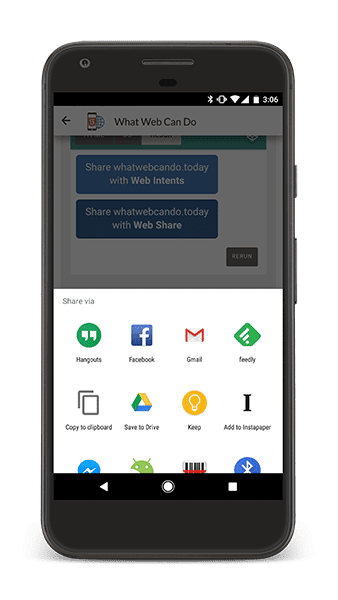
If you want users to be easily able to share your content on their favorite social network, you need to integrate sharing buttons into your site for each social network. It adds bloat to your page, doesn't always fit your UI nicely, and means you need to include code from a third party site.
The Web Share API, available today on Chrome for Android allows you to invoke the native sharing capabilities of the users device, allowing the user to easily share text or links with any of their installed native apps!
In a future release, this API will also be able to share to installed web apps. To use it, simply call navigator.share with the details of the page you want to share the system will handle the rest.
Check out Paul's WebShare API Update for full details and some best practices that you should be following.
WebUSB
Most hardware peripherals such as keyboards, mice, printers, and gamepads are supported by high-level web platform APIs. But, using specialized educational, scientific, industrial or other USB devices in the browser has been hard, often requiring specialized drivers.
Chrome now supports the WebUSB API, allowing web apps to communicate with USB devices, after the user has provided their consent. To learn more about the security and privacy considerations and how they're addressed, have a peek at the WebUSB spec.
Then, when you're ready to dive in, take a look at Francois' WebUSB post on updates.
And more!
- You can now specify scrolling smoothness with the
scroll-behaviorCSS property. - CSS hex color values can now specify alpha transparency by adding digits to the end of the string.
- You can access the relative positions of the screen content with the Visual Viewport API, exposing complex functionality like pinch-and-zoom in a more direct way.
These are just a few of the changes in Chrome 61 for developers.
Then subscribe to our YouTube channel, and you'll get an email notification whenever we launch a new video.
I'm Pete LePage, and as soon as Chrome 62 is released, I'll be right here to tell you -- what's new in Chrome!
Official source: Official Chrome update
Installation notes
After downloading the package, confirm that the branch and platform match your device before launching the installer or extracting the archive. If you only need a standard everyday browser, Stable is usually the safest choice. If you are testing new behavior, Beta, Dev, and Canary are better fits.
Related release pages
For newer or older builds in the same branch, open the category archive linked above. For different platforms, use the related desktop archives in the sidebar.
Frequently asked questions
These FAQ blocks help the page read like a complete release article instead of a download stub, which is better for trust and better for SEO.
Should I use this release or stay on Stable?
If you just want the safest everyday browsing experience, Stable is usually the right default. Preview branches are better for testing, compatibility checks, and early feature access.
Why show exact version numbers so prominently?
Because exact-version queries are common in English search behavior, especially for QA teams, enterprise users, and people trying to reproduce a bug or environment.
Why keep a full article around the download buttons?
A stronger page body gives users context and gives Google clearer signals about what the release page actually covers.
Where should older releases live?
Older versions belong in the category archive page, with this article template handling exact-version landing pages one release at a time.