
Download 67.0.3396.87 from the Chrome Stable for Linux
Download Google Chrome 67.0.3396.87 with the branch, platform, release date, and file size shown clearly on the same page.
What users usually want to know first
What changed in Chrome 67.0.3396.87
Google Chrome 67.0.3396.87 is available here as part of the Linux Stable archive. Use this release page when you want the exact version, the current package details, and quick access to the correct installer.
Desktop PWAs
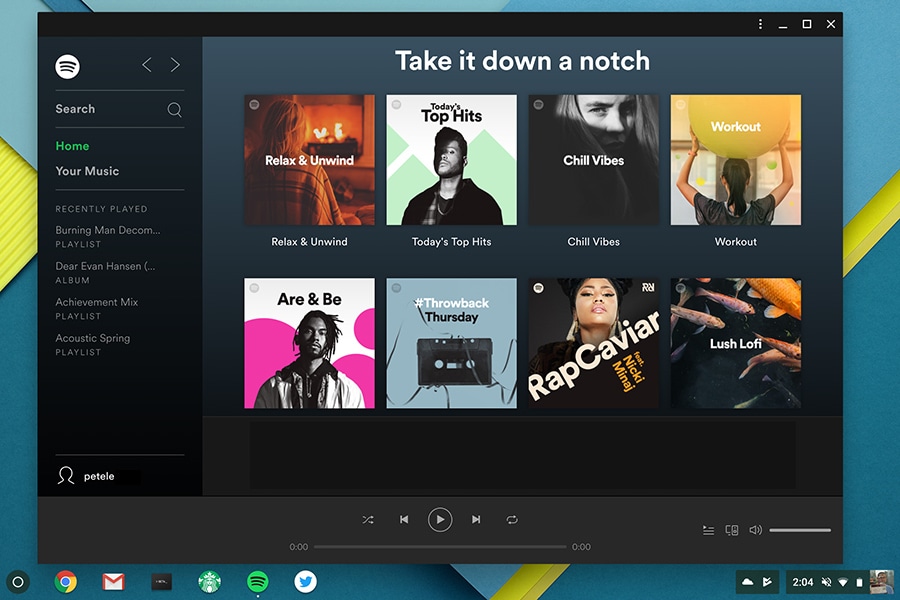
Desktop Progressive Web Apps are now supported on ChromeOS 67, and we've already started working on support for Mac and Windows. Once installed, they're launched in the same way as other apps, and run in an app window, without an address bar or tabs. Service workers ensure that they're fast, and reliably, the app window experience makes them feel integrated. And they create an engaging experience for your users.
Getting started isn't any different than what you're already doing today. All of the work you've done for your existing Progressive Web App still applies, you simply need to consider some additional break points.
If your app meets the standard PWA criteria, Chrome will fire the beforeinstallprompt event, but it won't automatically prompt the user. Instead, save the event; then, add some UI - like an install app button - to your app to tell the user your app can be installed. Then, when the user clicks the button, call prompt on the saved event; Chrome will then show the prompt to the user. If they click add, Chrome will add your PWA to their shelf and launcher.
Check out my Google I/O talk where Jenny and I go into detail about the technical and special design considerations you need to think about when building a desktop progressive web app.
And, if you want to start playing with this on Mac or Windows - check out the full Desktop Progressive Web App post for details on how to enable support with a flag.
Generic Sensor API
Sensor data is used in many apps to enable experiences like immersive gaming, fitness tracking, and augmented or virtual reality. This data is now available to web app using the Generic Sensor API.
The API consists of a base Sensor interface with a set of concrete sensor classes built on top. Having a base interface simplifies the implementation and specification process for the concrete sensor classes. For example, the Gyroscope class is super tiny!
The core functionality is specified by the base interface, and Gyroscope merely extends it with three attributes representing angular velocity. Chrome 67 supports the accelerometer, gyroscope, orientation sensor, and motion sensor.
Intel has put together several demos of the generic sensors API and sample code, and they've also updated the Sensors for the Web! post from September with everything you need to know.
BigInt s
BigInts are a new numeric primitive in JavaScript that can represent integers with arbitrary precision. Large integer IDs and high-accuracy timestamps can't be safely represented as Numbers in JavaScript, which often leads to real-world bugs (because of which we often end up representing such numbers as strings instead).
With BigInts, we can safely store and perform integer arithmetic without overflowing. Today, dealing with large integers typically means we have to resort to a library that would emulate BigInt-like functionality.
When BigInt becomes widely available, we'll be able to drop these run-time dependencies in favor of native BigInts. Not only is the native implementation faster, it'll help to reduce load time, parse time, and compile time because we won't have to load those extra libraries.
And more!
These are just a few of the changes in Chrome 67 for developers, of course, there's plenty more.
The Credential Management API has been supported since Chrome 51, and provides a framework for creating, retrieving and storing credentials. It did this through two credential types: PasswordCredential and FederatedCredential. The Web Authentication API adds a third credential type, PublicKeyCredential, which allows browsers to authenticate a user with a private/public key pair generated by an authenticator such as a security key, fingerprint reader, or any other device that can authenticate a user. Chrome 67 enables the API using U2F/CTAP 1 authenticators over USB transport on desktop.
Learn more about it in Eiji's Enabling Strong Authentication with WebAuthn post.
Google I/O is a wrap
If you didn't make it to I/O, or may you did, but didn't see all the web talks, check out the Chrome and Web playlist to get caught up on all the latest from Google I/O!
New in DevTools
Be sure to check out New in Chrome DevTools, to learn what's new in for DevTools in Chrome 67.
Then, click the subscribe button on our YouTube channel, and you'll get an email notification whenever we launch a new video.
I'm Pete LePage, and as soon as Chrome 68 is released, I'll be right here to tell you -- what's new in Chrome!
Official source: Official Chrome update
Installation notes
After downloading the package, confirm that the branch and platform match your device before launching the installer or extracting the archive. If you only need a standard everyday browser, Stable is usually the safest choice. If you are testing new behavior, Beta, Dev, and Canary are better fits.
Related release pages
For newer or older builds in the same branch, open the category archive linked above. For different platforms, use the related desktop archives in the sidebar.
Frequently asked questions
These FAQ blocks help the page read like a complete release article instead of a download stub, which is better for trust and better for SEO.
Should I use this release or stay on Stable?
If you just want the safest everyday browsing experience, Stable is usually the right default. Preview branches are better for testing, compatibility checks, and early feature access.
Why show exact version numbers so prominently?
Because exact-version queries are common in English search behavior, especially for QA teams, enterprise users, and people trying to reproduce a bug or environment.
Why keep a full article around the download buttons?
A stronger page body gives users context and gives Google clearer signals about what the release page actually covers.
Where should older releases live?
Older versions belong in the category archive page, with this article template handling exact-version landing pages one release at a time.