
Download 94.0.4606.81 from the Chrome Stable for Linux
Download Google Chrome 94.0.4606.81 with the branch, platform, release date, and file size shown clearly on the same page.
What users usually want to know first
What changed in Chrome 94.0.4606.81
Google Chrome 94.0.4606.81 is available here as part of the Linux Stable archive. Use this release page when you want the exact version, the current package details, and quick access to the correct installer.
Default color space for canvas elements
How color is rendered on screen is critical to some users. For photographers, print illustrators, and many others, the colors on screen need to match what's printed. Starting in Chrome 94, <canvas> elements are fully color managed using sRGB. Previously, sRGB was convention, but not explicitly defined in the spec.
More importantly, you can now specify which color space to use when creating a <canvas> rendering context 2d object, or an ImageData object, including the P3 color space.
WebCodecs
Putting video on a page is easy enough. But, if you need to do something a little more complex, and interact with the components of a video stream, it's hard, and typically requires you to use Web Assembly to ship your own codecs!
But shipping your own codec means writing code the browser already has, and it can't take advantage of hardware acceleration! The Web Codecs API makes it possible to use the media components and codecs that are already in the browser.
Personally, I've always struggled to remember the correct command line switches to encode a video for the web, or to convert a GIF to a video file. Using the APIs available via WebCodecs, I could quickly build a web app that reads a file and exports the correct files needed for the web.
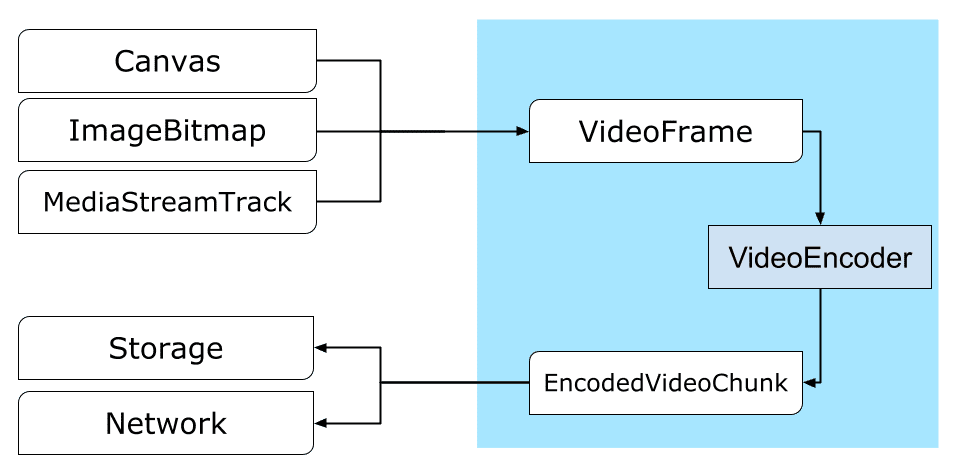
Web apps that require full control over the way media content is processed, like video editors, video conferencing, streaming apps, and so on. Access to the browsers built in media controls is huge.
Showing anything useful in thirty seconds is hard, so check out Video processing with WebCodecs on web.dev for a deep dive with lots of code and a few cool demos!
WebGPU
WebGPU is a new API that exposes modern graphics capabilities, specifically Direct3D 12, Metal, and Vulkan. You can think of it like WebGL, but it provides access to more advanced features of the GPU, and it also provides support for performing general computations on the GPU.
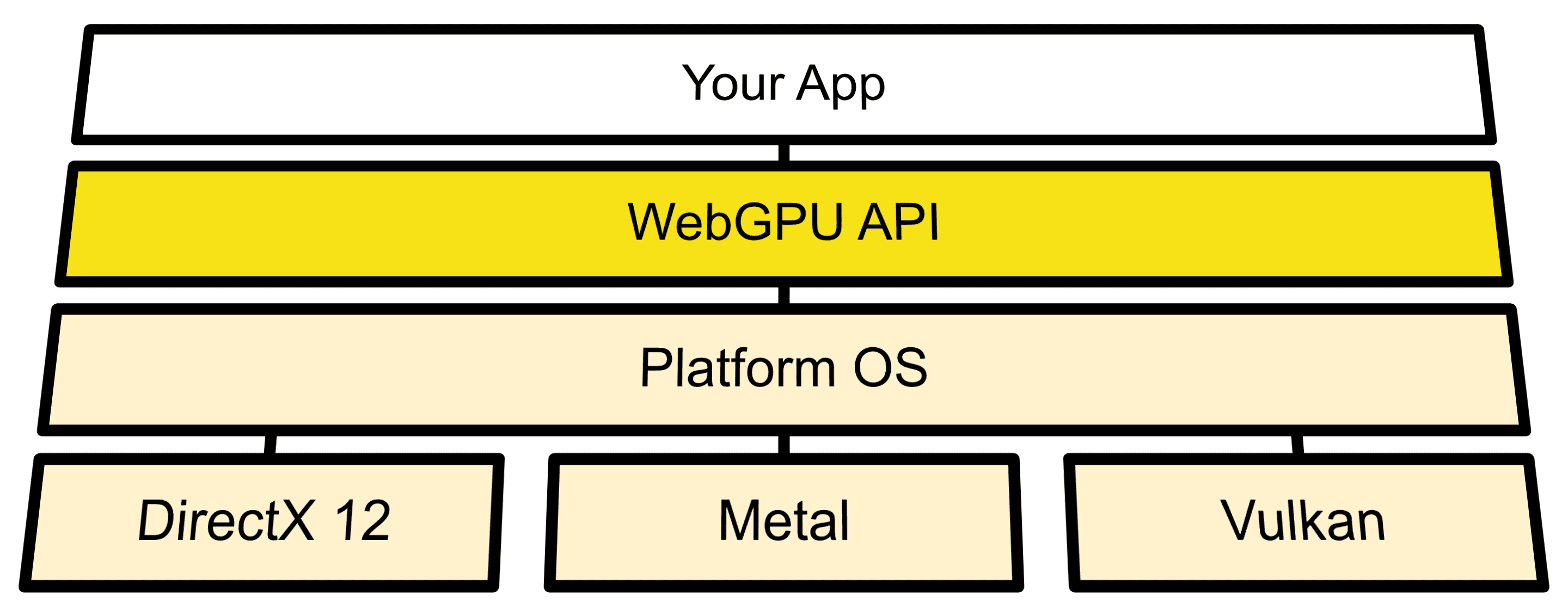
It's starting an origin trial in Chrome 94, and both Safari and Firefox are currently working on their implementations.
Francois has a great article, Access modern GPU features with WebGPU on web.dev with the details, and compares the performance of matrix multiplication running on the CPU versus the GPU. Here's a hint. The GPU wins.
PWA Summit
The PWA Summit is coming up October 6-7. It's a a free, online conference focused on helping everyone succeed with Progressive Web Apps. The PWA Summit is a collaboration between folks from a handful of different companies involved in the creation of PWA technologies: Google, Intel, Microsoft, and Samsung.
There are a ton of great talks and content. You can learn more and register at PWASummit.org. I hope to see you there!
And more!
Of course there's plenty more.
The prioritized scheduler.postTask() method allows you to schedule tasks, and dynamically change their priorities, or cancel them all together.
If you've ever fought with a re-layout when scroll bars appear, the scrollbar-gutter property will make you happy. It provides control over the presence of scrollbar gutters, allowing you to prevent layout changes as content expands.
The use of WebSQL in third-party contexts is now deprecated, and removal is expected in Chrome 97. Web SQL Database standard was abandoned in November 2010. It was never implemented in Firefox, and was deprecated in Safari in 2019. It will be deprecated and removed from Chrome when usage is low enough. If you're still using WebSQL, now would be a good time to start planning your migration off of it.
And the virtual keyboard API gives you more control over how and when the virtual, on-screen keyboard is shown. It allows you to explicitly control any scrolling behaviour, or changes to layout when the keyboard appears or disappears.
Official source: Official Chrome update
Installation notes
After downloading the package, confirm that the branch and platform match your device before launching the installer or extracting the archive. If you only need a standard everyday browser, Stable is usually the safest choice. If you are testing new behavior, Beta, Dev, and Canary are better fits.
Related release pages
For newer or older builds in the same branch, open the category archive linked above. For different platforms, use the related desktop archives in the sidebar.
Frequently asked questions
These FAQ blocks help the page read like a complete release article instead of a download stub, which is better for trust and better for SEO.
Should I use this release or stay on Stable?
If you just want the safest everyday browsing experience, Stable is usually the right default. Preview branches are better for testing, compatibility checks, and early feature access.
Why show exact version numbers so prominently?
Because exact-version queries are common in English search behavior, especially for QA teams, enterprise users, and people trying to reproduce a bug or environment.
Why keep a full article around the download buttons?
A stronger page body gives users context and gives Google clearer signals about what the release page actually covers.
Where should older releases live?
Older versions belong in the category archive page, with this article template handling exact-version landing pages one release at a time.