
Download 88.0.4324.190 from the Chrome Stable for Linux
Download Google Chrome 88.0.4324.190 with the branch, platform, release date, and file size shown clearly on the same page.
What users usually want to know first
What changed in Chrome 88.0.4324.190
Google Chrome 88.0.4324.190 is available here as part of the Linux Stable archive. Use this release page when you want the exact version, the current package details, and quick access to the correct installer.
Manifest V3
Chrome 88 now supports extensions built with Manifest V3, and you can upload them to the Chrome Web Store. Manifest V3 is a new extension platform, that makes Chrome extensions more secure, performant, and privacy respecting, by default.
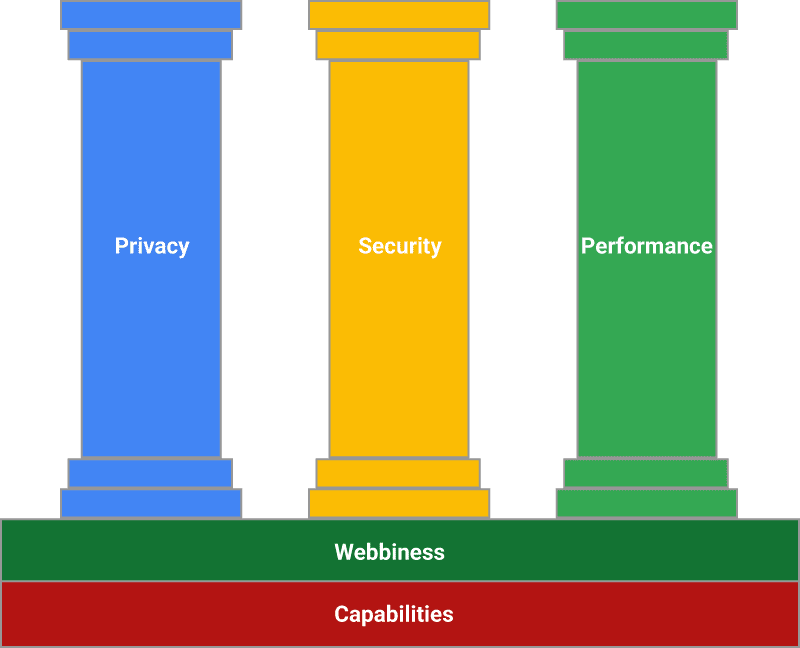
For example, it disallows remotely hosted code, which helps Chrome Web Store reviewers better understand what risks an extension poses. And should allow you to update your extensions faster.
It introduces service workers as a replacement for background pages. Since service workers are only resident in memory when needed, extensions will use less system resources.
And to give users greater visibility and control over how extensions use and share their data, in a future release we will be adopting a new install flow that allows users to withhold sensitive permissions at install time.
Check out developer.chrome.com for complete details, and how to migrate your current extension to Manifest V3.
CSS aspect-ratio property
Normally, only some elements have an aspect ratio, for example images. For them, if only the width, or the height, is specified, the other is automatically computed using the intrinsic aspect ratio.
In Chrome 88, the aspect-ratio property allows you to explicitly specify an aspect ratio, enabling a similar behavior.
You can also use progressive enhancement to check if it's supported in the browser, and apply a fallback if necessary. Then, with the new CSS 4 not selector, you can make your code a little cleaner!
Thanks to Jen Simmons for calling out this is supported in the latest Safari Technical Preview, so we should see it in Safari soon! And check out Una's demo to see it in action.
Heavy throttling of chained JS timers
Chrome 88 will heavily throttle chained JavaScript timers for hidden pages in particular conditions. This will reduce CPU usage, which will also reduce battery usage. There are some edge cases where this will change behavior, but timers are often used where a different API would be more efficient, and more reliable.
That was pretty jargon heavy, and a bit ambiguous, so check out Jake's article Heavy throttling of chained JS timers beginning in Chrome 88 for all the details.
Play billing in Trusted Web Activity
You can now use Play Billing in your Trusted Web Activity to sell digital goods and subscriptions using the new Digital Goods API. It's available as an origin trial in Chrome 88 on Android, and we expect it to expand the origin trial to ChromeOS in the next release.
Once your accounts are set-up, update your Trusted Web Activity to enable Play billing, and create your digital goods in the Play Developer Console. Then, in your PWA, add your origin trial token, and you're ready to add the code to check for existing purchases, query for available purchases, and make new purchases.
Adriana and Andre go into more detail in their Chrome Dev Summit talk - What's new for web apps in Play, or check out the docs.
And more
And of course there's plenty more.
- To conform to a change in the HTML standard, anchor tags with
target="_blank"will now implyrel="noopener"by default, this helps prevent tab-napping attacks. - Most operating systems enable mouse acceleration by default, but that can be a problem for some games. In Chrome 88, the Pointer Lock API allows you to disable mouse acceleration. That means the same physical motion, slow or fast, results in the same rotation, providing a better gaming experience and higher accuracy.
- And
addEventListenernow takes an Abort Signal as an option. Callingabort()removes that event listener, making it easy to shut down event listeners when no longer needed.
Official source: Official Chrome update
Installation notes
After downloading the package, confirm that the branch and platform match your device before launching the installer or extracting the archive. If you only need a standard everyday browser, Stable is usually the safest choice. If you are testing new behavior, Beta, Dev, and Canary are better fits.
Related release pages
For newer or older builds in the same branch, open the category archive linked above. For different platforms, use the related desktop archives in the sidebar.
Frequently asked questions
These FAQ blocks help the page read like a complete release article instead of a download stub, which is better for trust and better for SEO.
Should I use this release or stay on Stable?
If you just want the safest everyday browsing experience, Stable is usually the right default. Preview branches are better for testing, compatibility checks, and early feature access.
Why show exact version numbers so prominently?
Because exact-version queries are common in English search behavior, especially for QA teams, enterprise users, and people trying to reproduce a bug or environment.
Why keep a full article around the download buttons?
A stronger page body gives users context and gives Google clearer signals about what the release page actually covers.
Where should older releases live?
Older versions belong in the category archive page, with this article template handling exact-version landing pages one release at a time.