
Download 72.0.3626.81 from the Chrome Stable for Windows 32-bit
Download Google Chrome 72.0.3626.81 with the branch, platform, release date, and file size shown clearly on the same page.
What users usually want to know first
What changed in Chrome 72.0.3626.81
Google Chrome 72.0.3626.81 is available here as part of the Windows 32-bit Stable archive. Use this release page when you want the exact version, the current package details, and quick access to the correct installer.
Change log
This covers only some of the key highlights, check the links below for additional changes in Chrome 72.
- Chromium source repository change list
- ChromeStatus.com updates for Chrome 72
- Chrome 72 deprecations & removals
Public class fields
My first language was Java, and learning JavaScript threw me for a bit of a loop. How did I create a class? Or inheritance? What about public and private properties and methods? Many of the recent updates to JavaScript that make object oriented programming much easier.
I can now create classes, that work like I expect them to, complete with constructors, getters and setters, static methods and public properties.
Thanks to V8 7.2, which ships with Chrome 72, you can now declare public class fields directly in the class definition, eliminating the need to do it in the constructor.
Support for private class fields is in the works!
More details are in Mathias's article on class fields for more details.
User Activation API
Remember when sites could automatically play sound as soon as the page loaded? You scramble to hit the mute key, or figure out which tab it was, and close it. That's why some APIs require activation via a user gesture before they'll work. Unfortunately, browsers handle activation in different ways.
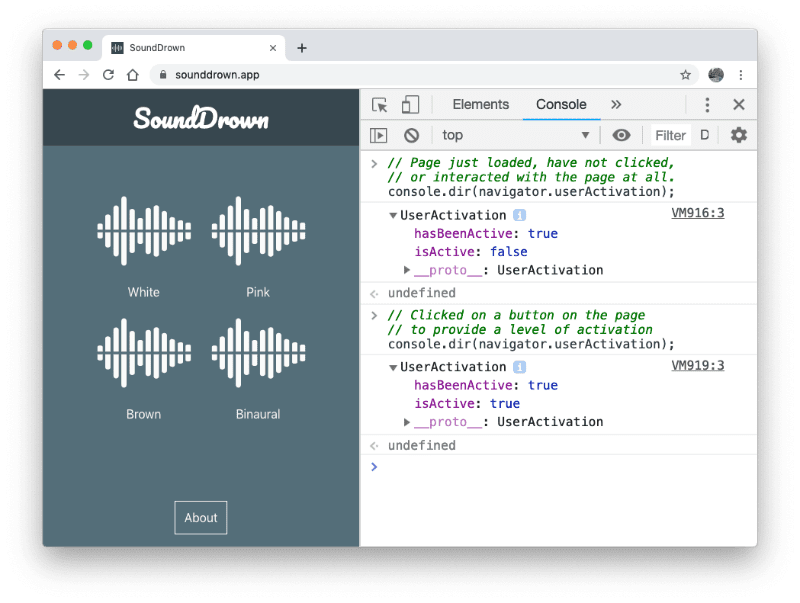
Chrome 72 introduces User Activation v2, which simplifies user activation for all gated APIs. It's based on a new specification that aims to standardize how activation works across all browsers.
There's a new userActivation property on both navigator and MessageEvent, that has two properties: hasBeenActive and isActive:
hasBeenActiveindicates if the associated window has ever seen a user activation in its lifecycle.isActiveindicates if the associated window currently has a user activation in its lifecycle.
More details are in Making user activation consistent across APIs
Localizing lists of things with Intl.format
I love the Intl APIs, they're super helpful for localizing content into other languages! In Chrome 72, there's a new .format() method that makes rendering lists easier. Like other Intl APIs, it shifts the burden to the JavaScript engine, without sacrificing performance.
Initialize it with the locale you want, then call format, and it'll use the correct words and syntax. It can do conjunctions - which adds the localized equivalent of and (and look at those beautiful oxford commas). It can do disjunctions - adding the local equivalent of or. And by providing some additional options, you can do even more.
Check out the Intl.ListFormat API post for more details!
And more!
These are just a few of the changes in Chrome 72 for developers, of course, there's plenty more.
- Chrome 72 changes the behavior of
Cache.addAll()to better match the spec. Previously, if there were duplicate entries in the same call, later requests would simply overwrite the first. To match the spec, if there are duplicate entries, it will reject with anInvalidStateError. - Requests for favicons are now handled by the service worker, as long as the request URL is on the same origin as the service worker.
Want to stay up to date with our videos, then subscribe to our Chrome Developers YouTube channel, and you'll get an email notification whenever we launch a new video.
I'm Pete LePage, and as soon as Chrome 73 is released, I'll be right here to tell you -- what's new in Chrome!
Official source: Official Chrome update
Installation notes
After downloading the package, confirm that the branch and platform match your device before launching the installer or extracting the archive. If you only need a standard everyday browser, Stable is usually the safest choice. If you are testing new behavior, Beta, Dev, and Canary are better fits.
Related release pages
For newer or older builds in the same branch, open the category archive linked above. For different platforms, use the related desktop archives in the sidebar.
Frequently asked questions
These FAQ blocks help the page read like a complete release article instead of a download stub, which is better for trust and better for SEO.
Should I use this release or stay on Stable?
If you just want the safest everyday browsing experience, Stable is usually the right default. Preview branches are better for testing, compatibility checks, and early feature access.
Why show exact version numbers so prominently?
Because exact-version queries are common in English search behavior, especially for QA teams, enterprise users, and people trying to reproduce a bug or environment.
Why keep a full article around the download buttons?
A stronger page body gives users context and gives Google clearer signals about what the release page actually covers.
Where should older releases live?
Older versions belong in the category archive page, with this article template handling exact-version landing pages one release at a time.