
Download 71.0.3578.98 from the Chrome Stable for Windows 32-bit
Download Google Chrome 71.0.3578.98 with the branch, platform, release date, and file size shown clearly on the same page.
What users usually want to know first
What changed in Chrome 71.0.3578.98
Google Chrome 71.0.3578.98 is available here as part of the Windows 32-bit Stable archive. Use this release page when you want the exact version, the current package details, and quick access to the correct installer.
Change log
This covers only some of the key highlights, check the links below for additional changes in Chrome 71.
- Chromium source repository change list
- ChromeStatus.com updates for Chrome 71
- Chrome 71 deprecations & removals
Display relative times with Intl.RelativeTimeFormat()
Many web apps use phrases like "yesterday", "in two days", or "an hour ago" to indicate when something happened - or is going to happen, instead of displaying the full date and time.
Displaying relative times has become so common that most of the common date/time libraries provide localized functions to handle this for us. In fact, almost every web app I build, Moment JS is one of the first libraries I add, expressly for this purpose.
Chrome 71 introduces Intl.RelativeTimeFormat(), which shifts the work to the JavaScript engine, and enables localized formatting of relative times. This gives us a small performance boost, and means we only need those libraries as a polyfill when a browser doesn't support the new APIs yet.
Using it is simple, create a new instance and specify the locale, then just call format with the relative time. Check out Mathias' The Intl.RelativeTimeFormat API post for full details.
Specifying underline location for vertical text
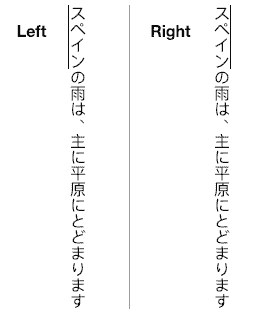
When Chinese or Japanese text is displayed in a vertical flow, browsers are inconsistent with where the underline is placed, it may be on the left, or on the right.
In Chrome 71, the text-underline-position property now accepts left or right as part of the CSS3 text decoration spec. The CSS3 text decoration spec adds several new properties that allow use to specify things like what kind of line to use, the style, color, and position.
Speech synthesis requires user activation
We've all been surprised when we hit a site and it suddenly starts talking to us. Autoplay policies prevent sites from automatically playing playing audio, or video files with audio. Some sites have tried to get around this by using the speech synthesis API instead.
Starting in Chrome 71, the speech synthesis API now requires some kind of user activation on the page before it'll work. This brings it in line with other autoplay policies. If you try to use it before the user has interacted with the page, it will fire an error.
There's nothing worse than going to a site and having it surprise you, and the co-workers sitting around you.
And more!
These are just a few of the changes in Chrome 71 for developers, of course, there's plenty more.
- The
Element.requestFullscreen()method can now be customized on Android and allows you to choose between making the navigation bar visible versus a completely immersive mode where no user agent controls are shown until a user gesture is performed. - The default credentials mode for module script requests, has changed from
omittosame-origin. - And bringing Chrome inline with the Shadow DOM v1 spec, Chrome 71 now calculates the specificity for the
:host()and:host-context()pseudo classes as well as for the arguments for::slotted().
Official source: Official Chrome update
Installation notes
After downloading the package, confirm that the branch and platform match your device before launching the installer or extracting the archive. If you only need a standard everyday browser, Stable is usually the safest choice. If you are testing new behavior, Beta, Dev, and Canary are better fits.
Related release pages
For newer or older builds in the same branch, open the category archive linked above. For different platforms, use the related desktop archives in the sidebar.
Frequently asked questions
These FAQ blocks help the page read like a complete release article instead of a download stub, which is better for trust and better for SEO.
Should I use this release or stay on Stable?
If you just want the safest everyday browsing experience, Stable is usually the right default. Preview branches are better for testing, compatibility checks, and early feature access.
Why show exact version numbers so prominently?
Because exact-version queries are common in English search behavior, especially for QA teams, enterprise users, and people trying to reproduce a bug or environment.
Why keep a full article around the download buttons?
A stronger page body gives users context and gives Google clearer signals about what the release page actually covers.
Where should older releases live?
Older versions belong in the category archive page, with this article template handling exact-version landing pages one release at a time.