
Download 65.0.3325.162 from the Chrome Stable for Windows 32-bit
Download Google Chrome 65.0.3325.162 with the branch, platform, release date, and file size shown clearly on the same page.
What users usually want to know first
What changed in Chrome 65.0.3325.162
Google Chrome 65.0.3325.162 is available here as part of the Windows 32-bit Stable archive. Use this release page when you want the exact version, the current package details, and quick access to the correct installer.
CSS Paint API
The CSS Paint API allows you to programmatically generate an image for CSS properties like background-image or border-image.
Instead of referencing an image, you can use the new paint function to draw the image - much like a canvas element.
For example, instead of adding extra DOM elements to create the ripple effect on a material styled button, you could use the paint API.
It's also a powerful method of polyfilling CSS features that aren't supported in a browser yet.
Surma has a great post with several demos in his explainer.
Server Timing API
Hopefully you're using the navigation and resource timing APIs to track the performance of your site for real users. Until now, there hasn't been an easy way for the server to report its performance timing.
The new Server Timing API allows your server to pass timing information to the browser; giving you a better picture of your overall performance.
You can track as many metrics as you want: database read times, start-up time, or whatever is important to you, by adding a Server-Timing header to your response:
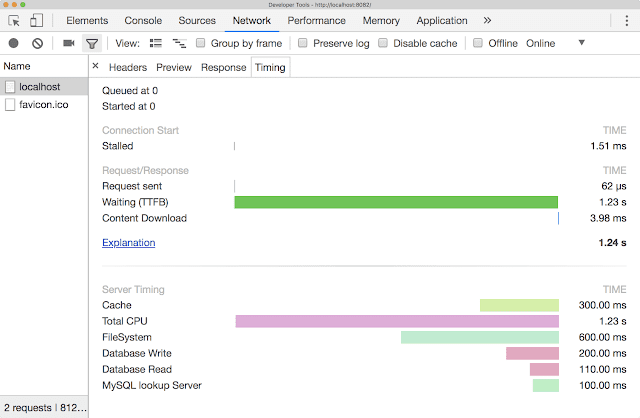
They're shown in Chrome DevTools, or you can pull them out of the response header and save them with your other performance analytics.
display: contents
The new CSS display: contents property is pretty slick!
When added to a container element, any children take its place in the DOM, and it essentially disappears. Let's say I've got two div's, one inside the other. My outer div has a red border, a gray background and I've set a width of 200 pixels. The inner div has a blue border, and a light blue background.
By default, the inner div is contained in the outer div.
Adding display: contents to the outer div, makes the outer div disappear and its constraints are no longer applied to the inner div. The inner div is now 100% width.
There are plenty of cases where this might be helpful, but the most common one is with flexbox. With flexbox, only the immediate children of a flex container become flex items.
But, once you apply display: contents to a child, its children become flex items and are laid out using the same rules that would have been applied to their parent.
Check out Rachel Andrew's excellent post Vanishing boxes with display contents for more details and other examples.
And more!
These are just a few of the changes in Chrome 65 for developers, of course, there's plenty more.
- The syntax for specifying
HSLandHSLA, andRGBandRGBAcoordinates for the color property now match the CSS Color 4 spec. - There's a new feature policy that allows you to control synchronous XHRs through an HTTP header or the iframe
allowattribute.
Be sure to check out New in Chrome DevTools, to learn what's new in for DevTools in Chrome 65. And, if you're interested in Progressive Web Apps, check out the new PWA Roadshow video series. Then, click the subscribe button on our YouTube channel, and you'll get an email notification whenever we launch a new video.
I'm Pete LePage, and as soon as Chrome 66 is released, I'll be right here to tell you -- what's new in Chrome!
Official source: Official Chrome update
Installation notes
After downloading the package, confirm that the branch and platform match your device before launching the installer or extracting the archive. If you only need a standard everyday browser, Stable is usually the safest choice. If you are testing new behavior, Beta, Dev, and Canary are better fits.
Related release pages
For newer or older builds in the same branch, open the category archive linked above. For different platforms, use the related desktop archives in the sidebar.
Frequently asked questions
These FAQ blocks help the page read like a complete release article instead of a download stub, which is better for trust and better for SEO.
Should I use this release or stay on Stable?
If you just want the safest everyday browsing experience, Stable is usually the right default. Preview branches are better for testing, compatibility checks, and early feature access.
Why show exact version numbers so prominently?
Because exact-version queries are common in English search behavior, especially for QA teams, enterprise users, and people trying to reproduce a bug or environment.
Why keep a full article around the download buttons?
A stronger page body gives users context and gives Google clearer signals about what the release page actually covers.
Where should older releases live?
Older versions belong in the category archive page, with this article template handling exact-version landing pages one release at a time.