
Download 60.0.3112.113 from the Chrome Stable for Windows 32-bit
Download Google Chrome 60.0.3112.113 with the branch, platform, release date, and file size shown clearly on the same page.
What users usually want to know first
What changed in Chrome 60.0.3112.113
Google Chrome 60.0.3112.113 is available here as part of the Windows 32-bit Stable archive. Use this release page when you want the exact version, the current package details, and quick access to the correct installer.
Paint timings API
When a user navigates to a web page, they're look for some visual feedback to reassure them that everything is working. With the new paint timings API, we can now measure that.
The API exposes two metrics:
- Time to first paint - which marks the point when the browser starts to render something, the first bit of content on the screen.
- Time to first contentful paint - which marks the point when the browser renders the first bit of content from the DOM, text, an image, etc.
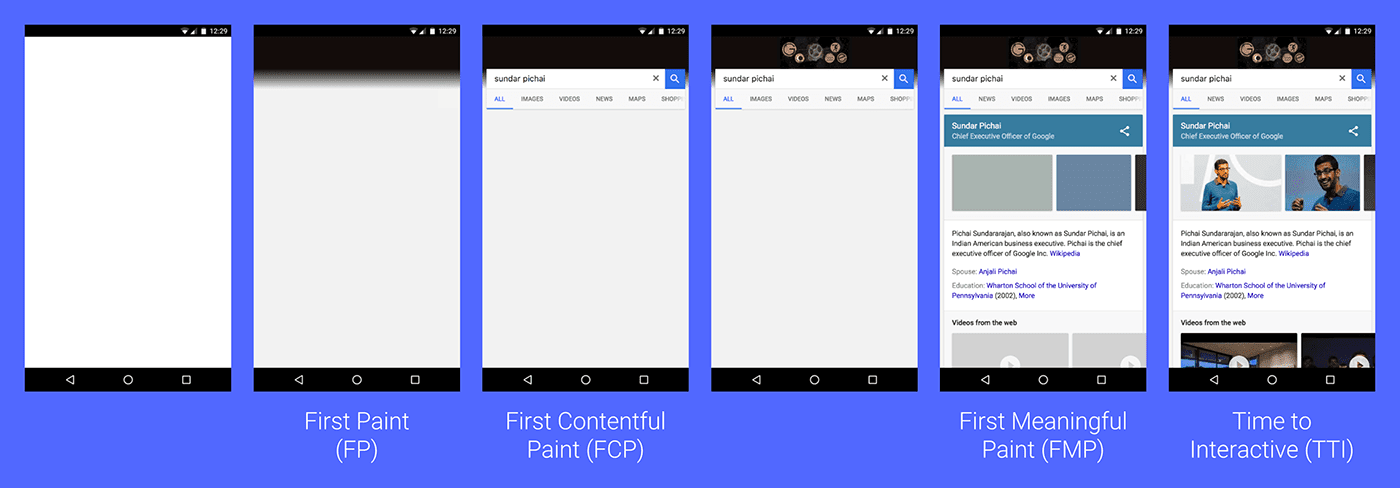
Check out Leveraging the Performance Metrics that Most Affect User Experience to learn how you can track these metrics and use them to improve your experience.
CSS font-display property
Web Fonts give you the ability to incorporate rich typography. But, if the user doesn't already have the typeface, it needs to be downloaded, potentially making your site appear slow.
Thankfully, most browsers will use a fallback if the font takes too long to download. The new font-display property, allows you to control how a downloadable font renders before it's fully loaded.
autouses whatever font display strategy the user-agent uses.blockgives the font face a short block period and an infinite swap period.swapgives the font face a zero second block period and an infinite swap period.fallbackgives the font face an extremely small block period and a short swap period.optionalgives the font face an extremely small block period and a zero second swap period.
It's supported in Chrome 60 and Opera, and is in development on Firefox. Check out Controlling Font Performance with font-display for more information.
WebAssembly
Web Assembly or wasm provides a new way to run code, written in languages like C and C++ on the web, at near native speed.
It provides the speed necessary to build an in-browser video editor or to run a Unity game at a high frame rate utilizing existing standards-based web platform APIs.
You can find more info at webassembly.org, including demos, docs and how to get started.
And more!
- The new Web Budget API enables sites with the Push Notification permission to send a limited number of push messages that trigger background work such as syncing data or dismissing notifications, without the need to show a user-visible notification.
PushSubscription.expirationTimeis now available, notifying sites when and if a subscription will expire.- Object rest & spread properties are now supported, making it simpler to merge and shallow-clone objects and implement various immutable object patterns.
Note: The Payment Request API was pushed to Chrome 61.
These are just a few of the changes in Chrome 60 for developers.
Then subscribe to our YouTube channel, and you'll get an email notification whenever we launch a new video.
I'm Pete LePage, and as soon as Chrome 61 is released, I'll be right here to tell you -- what's new in Chrome!
Official source: Official Chrome update
Installation notes
After downloading the package, confirm that the branch and platform match your device before launching the installer or extracting the archive. If you only need a standard everyday browser, Stable is usually the safest choice. If you are testing new behavior, Beta, Dev, and Canary are better fits.
Related release pages
For newer or older builds in the same branch, open the category archive linked above. For different platforms, use the related desktop archives in the sidebar.
Frequently asked questions
These FAQ blocks help the page read like a complete release article instead of a download stub, which is better for trust and better for SEO.
Should I use this release or stay on Stable?
If you just want the safest everyday browsing experience, Stable is usually the right default. Preview branches are better for testing, compatibility checks, and early feature access.
Why show exact version numbers so prominently?
Because exact-version queries are common in English search behavior, especially for QA teams, enterprise users, and people trying to reproduce a bug or environment.
Why keep a full article around the download buttons?
A stronger page body gives users context and gives Google clearer signals about what the release page actually covers.
Where should older releases live?
Older versions belong in the category archive page, with this article template handling exact-version landing pages one release at a time.