
Download 59.0.3071.115 from the Chrome Stable for Windows 32-bit
Download Google Chrome 59.0.3071.115 with the branch, platform, release date, and file size shown clearly on the same page.
What users usually want to know first
What changed in Chrome 59.0.3071.115
Google Chrome 59.0.3071.115 is available here as part of the Windows 32-bit Stable archive. Use this release page when you want the exact version, the current package details, and quick access to the correct installer.
Headless Chrome
A headless browser is a great tool for running automated tests and server environments where you don't need to see the rendered output or have a visible UI shell. For example:
- Using Selenium for unit tests against your progressive web app
- To create a PDF of a wikipedia page
- Inspecting a page with DevTools
Starting in Chrome 59, you can now run headless Chrome. It brings all modern web platform features provided by Chrome to the command line.
Check out Eric Bidelman's post on Updates for full details. He's got examples on how you can use it to convert pages to PDF, dump the DOM and how to use it programmatically in Node.
Native notifications on macOS
Chrome has historically included its own notification system for web and extension developers to show notifications to users. But, we've heard from users and developers alike that they want Chrome to use the native OS notification system.
Starting in Chrome 59 on mac OS, Chrome will use the native notification system, improving the user experience and ensuring that the notifications feel more integrated in the platform. My personal favorite, notifications will now respect my do not disturb settings.
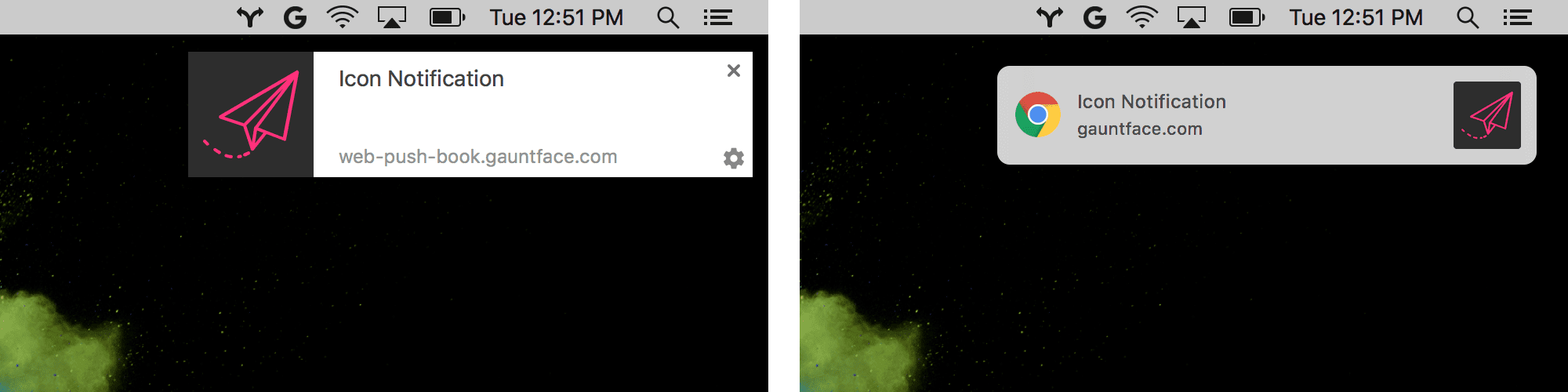
Because of the way macOS handles notifications, there are a few low usage APIs that are now discouraged, as they'll result in a degraded experience on macOS.
Check out our Updates post for all the details.
Image capture API
Capturing high res photos in a web app can be hard. Either the user has to upload a photo they've already taken, or switch from the browser to the camera, take the photo, switch back to the browser and upload the photo.
With the new Image Capture API in Chrome 59, you have to access the full resolution capabilities of any available camera. The API provides control of features such as zoom, brightness, contrast, ISO and even white balance.
Check Sam's post for full details and sample code you can use to get started right away.
And more!
- The
MediaError.messagestring provides, if available, any additional error message detail to help web developers debugging media player errors.
These are just a few of the changes in Chrome 59 for developers.
If you enjoyed this video, check out Designer vs. Developer, a new video series that tries to solve the challenges faced when designers and developers work together.
Then subscribe to our YouTube channel, and you'll get an email notification whenever we launch a new video.
I'm Pete LePage, and as soon as Chrome 60 is released, I'll be right here to tell you -- what's new in Chrome!
Official source: Official Chrome update
Installation notes
After downloading the package, confirm that the branch and platform match your device before launching the installer or extracting the archive. If you only need a standard everyday browser, Stable is usually the safest choice. If you are testing new behavior, Beta, Dev, and Canary are better fits.
Related release pages
For newer or older builds in the same branch, open the category archive linked above. For different platforms, use the related desktop archives in the sidebar.
Frequently asked questions
These FAQ blocks help the page read like a complete release article instead of a download stub, which is better for trust and better for SEO.
Should I use this release or stay on Stable?
If you just want the safest everyday browsing experience, Stable is usually the right default. Preview branches are better for testing, compatibility checks, and early feature access.
Why show exact version numbers so prominently?
Because exact-version queries are common in English search behavior, especially for QA teams, enterprise users, and people trying to reproduce a bug or environment.
Why keep a full article around the download buttons?
A stronger page body gives users context and gives Google clearer signals about what the release page actually covers.
Where should older releases live?
Older versions belong in the category archive page, with this article template handling exact-version landing pages one release at a time.