
Download 58.0.3029.81 from the Chrome Stable for Windows 32-bit
Download Google Chrome 58.0.3029.81 with the branch, platform, release date, and file size shown clearly on the same page.
What users usually want to know first
What changed in Chrome 58.0.3029.81
Google Chrome 58.0.3029.81 is available here as part of the Windows 32-bit Stable archive. Use this release page when you want the exact version, the current package details, and quick access to the correct installer.
IndexedDB 2.0
The structure of your site's database has large performance impacts, and can be difficult to change. IndexedDB 2.0 changes that.
objectstores andindexescan now be renamed in-place after a refactoring.- Binary keys allow more natural keys without worrying about performance penalties.
- Data retrieval is easier with the
getKey(),openKeyCursor()andcontinuePrimaryKey()methods.
And bulk recovery of entire datasets no longer needs a cursor with the getAll() and getAllKey().
Full screen Progressive Web Apps
When Progressive Web Apps are launched from the Android home screen, they launch in a standalone app-like mode that hides the omnibox. This helps create an engaging user experience, and frees up screen space for content.
However, for even more immersive experiences like games, video players, or other rich content, mobile UI elements such as the system bars can still be a distraction and take up valuable pixels that you may want.
Now you can make your Progressive Web App feel fully immersive by setting display: fullscreen in your web app manifest.
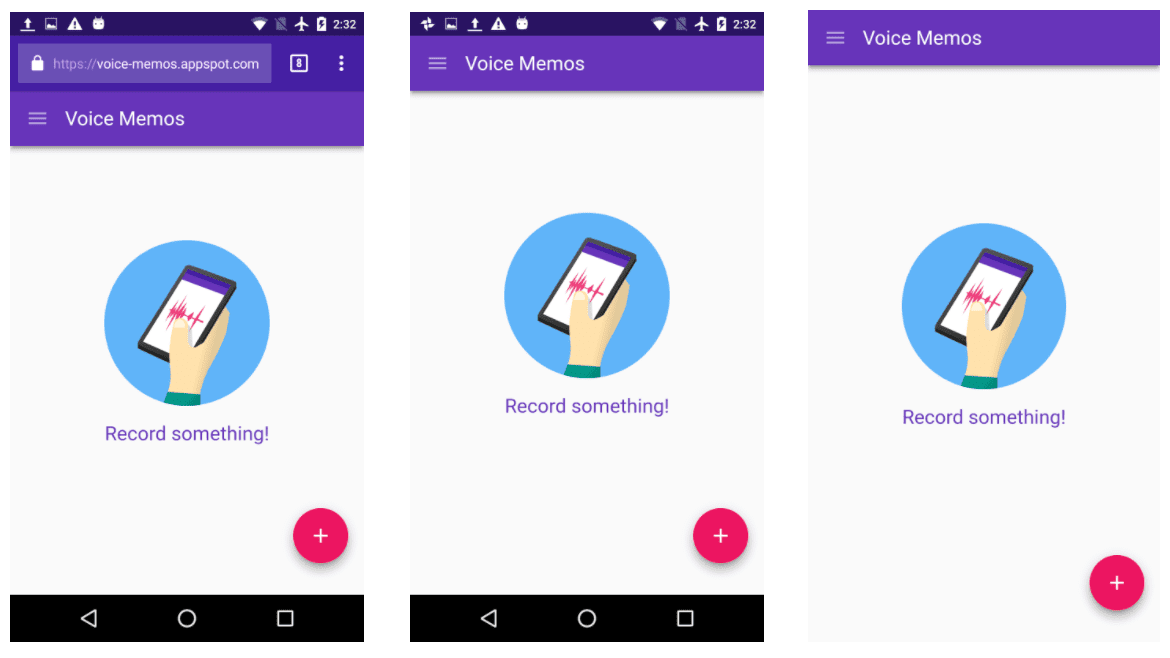
When your app is launched from the home screen, all non-app mobile UI elements will be hidden.
Sandboxed iframe Improvements
Chrome 58 now supports the new iframe sandbox keyword allow-top-navigation-by-user-activation.
When triggered by a user interaction, this keyword gives sandboxed iframes the ability to navigate the top-level page, while still blocking auto-redirects.
And more!
And of course, there's plenty more.
- Say goodbye to the
clearfixhack. Instead of manually resetting multiple layout properties like float and clear, you can now add a new block-formatting context usingdisplay: flow-root. PointerEvents.getCoalescedEvents()allows you to access all input events since the last time aPointerEventwas delivered. Perfect for when you need a precise history of points for things like drawing apps.- And
WorkersandSharedWorkerscan now be created usingdata:URLs, making development withWorkersmore secure by giving them an opaque origin.
These are just a few of the changes in Chrome 58 for developers.
If you enjoyed this video, check out Designer vs. Developer, a new video series that tries to solve the challenges faced when designers and developers work together.
Then subscribe to our YouTube channel, and you'll get an email notification whenever we launch a new video.
I'm Pete LePage, and as soon as Chrome 59 is released, I'll be right here to tell you -- what's new in Chrome!
Official source: Official Chrome update
Installation notes
After downloading the package, confirm that the branch and platform match your device before launching the installer or extracting the archive. If you only need a standard everyday browser, Stable is usually the safest choice. If you are testing new behavior, Beta, Dev, and Canary are better fits.
Related release pages
For newer or older builds in the same branch, open the category archive linked above. For different platforms, use the related desktop archives in the sidebar.
Frequently asked questions
These FAQ blocks help the page read like a complete release article instead of a download stub, which is better for trust and better for SEO.
Should I use this release or stay on Stable?
If you just want the safest everyday browsing experience, Stable is usually the right default. Preview branches are better for testing, compatibility checks, and early feature access.
Why show exact version numbers so prominently?
Because exact-version queries are common in English search behavior, especially for QA teams, enterprise users, and people trying to reproduce a bug or environment.
Why keep a full article around the download buttons?
A stronger page body gives users context and gives Google clearer signals about what the release page actually covers.
Where should older releases live?
Older versions belong in the category archive page, with this article template handling exact-version landing pages one release at a time.