
Download 114.0.5735.133 from the Chrome Stable for Windows 32-bit
Download Google Chrome 114.0.5735.133 with the branch, platform, release date, and file size shown clearly on the same page.
What users usually want to know first
What changed in Chrome 114.0.5735.133
Google Chrome 114.0.5735.133 is available here as part of the Windows 32-bit Stable archive. Use this release page when you want the exact version, the current package details, and quick access to the correct installer.
text-wrap:balance .
Use text-wrap: balance to improve text layouts. The animation below shows the difference you can make with this one line.
As a developer, you don’t know the final size, font size, or even language of text. All variables are needed for an effective treatment of text wrapping. Since the browser does know all the factors, with text-wrap:balance you can request the browser to figure out the best balanced line wrapping solution.
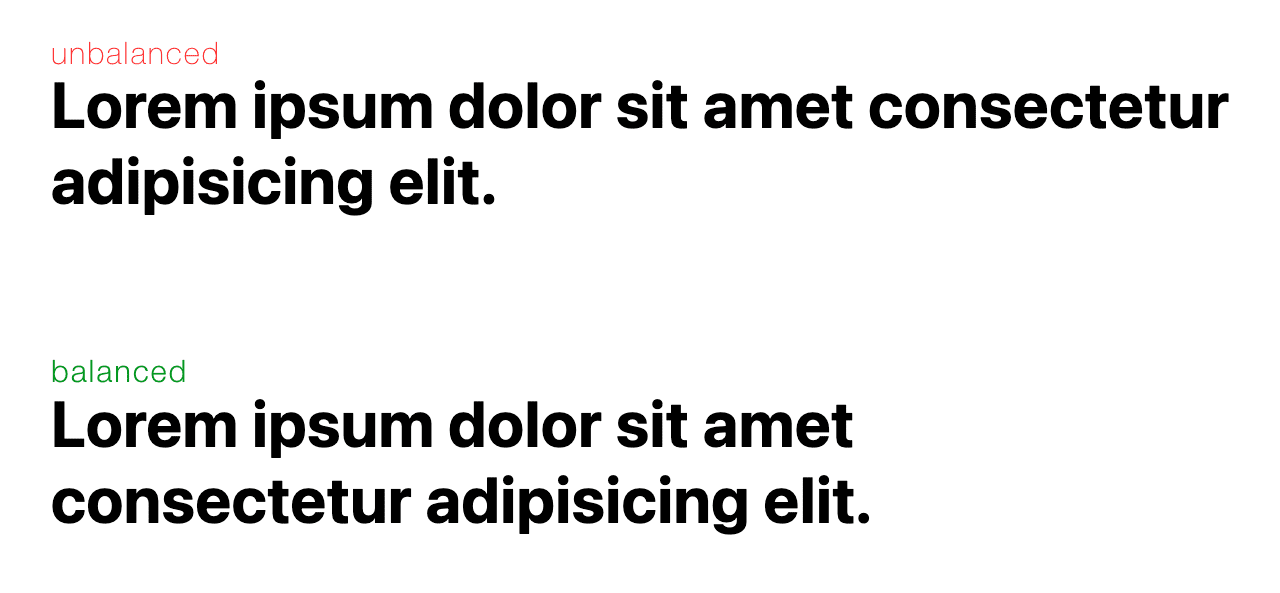
The balanced text block is more pleasing to the eye of a reader. It grabs attention better and is overall easier to read.
Balancing headlines will and should be the primary use case for text-wrap: balance. There is a performance cost to balance the text, so to mitigate the cost it only works for up to four lines.
Check out this article with samples and more details to improve your text layouts.
CHIPS: Cookies Having Independent Partitioned State.
CHIPS (Cookies Having Independent Partitioned State), enables opting-in to third-party cookies being partitioned by top-level site using the new cookie attribute Partitioned.
Before CHIPS, when a user visits site A, embedded site C could set a cookie on the user's machine. If the user then visits site B which also embeds site C, site C could access the same cookie that was set on site A. This allows site C to compile a user's browsing activity across site A, B, and every site that it is embedded on.
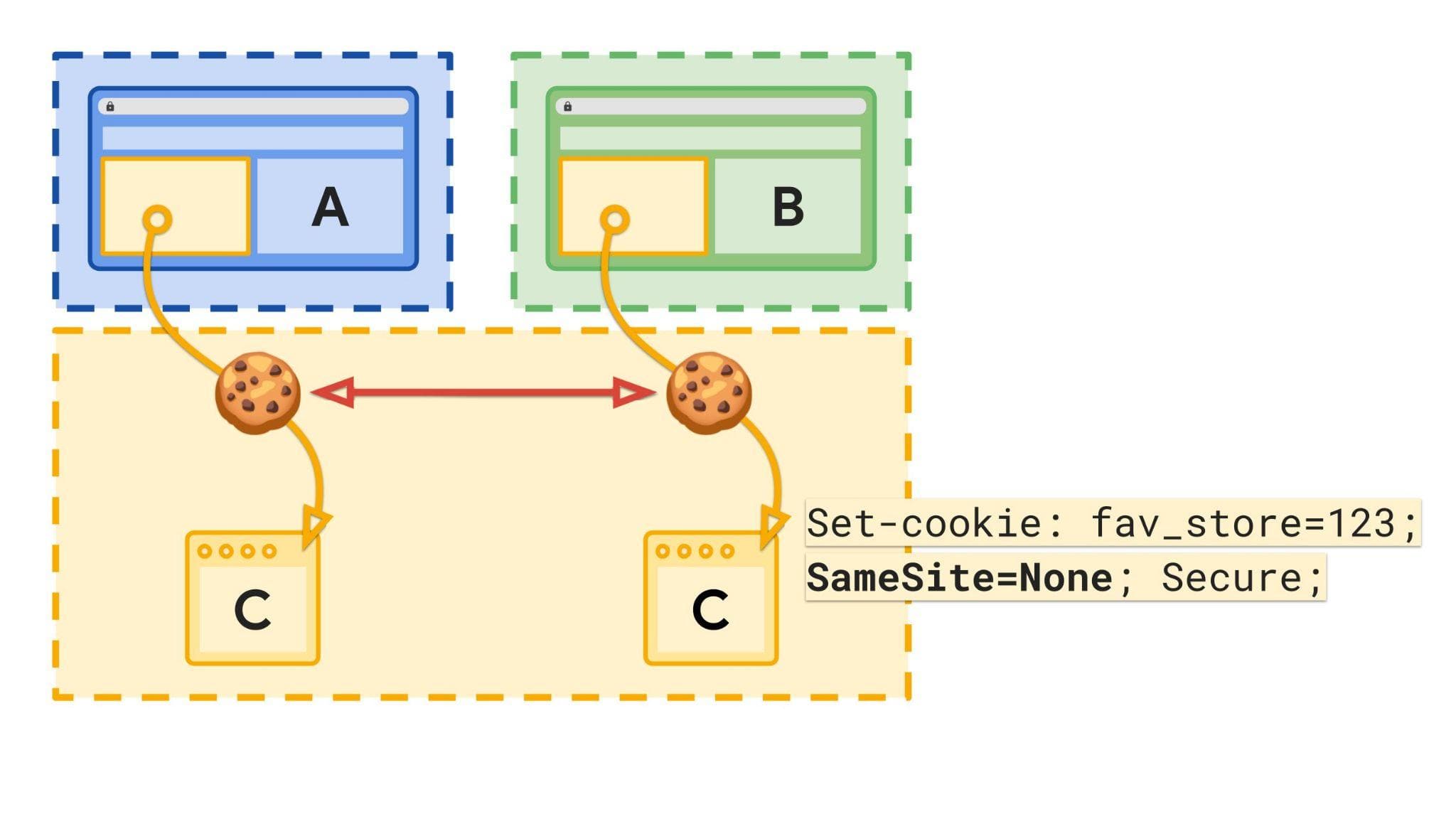
While cross-site tracking is an issue, there are valid cross-site cookie needs which can be achieved in a privacy-preserving way with cookie partitioning.
With CHIPS when a user visits site A and embedded content from site C sets a cookie with the Partitioned attribute, the cookie is saved in a partitioned jar only for cookies that site C sets when it's embedded on site A. The browser would only send that cookie when the top-level site is A.
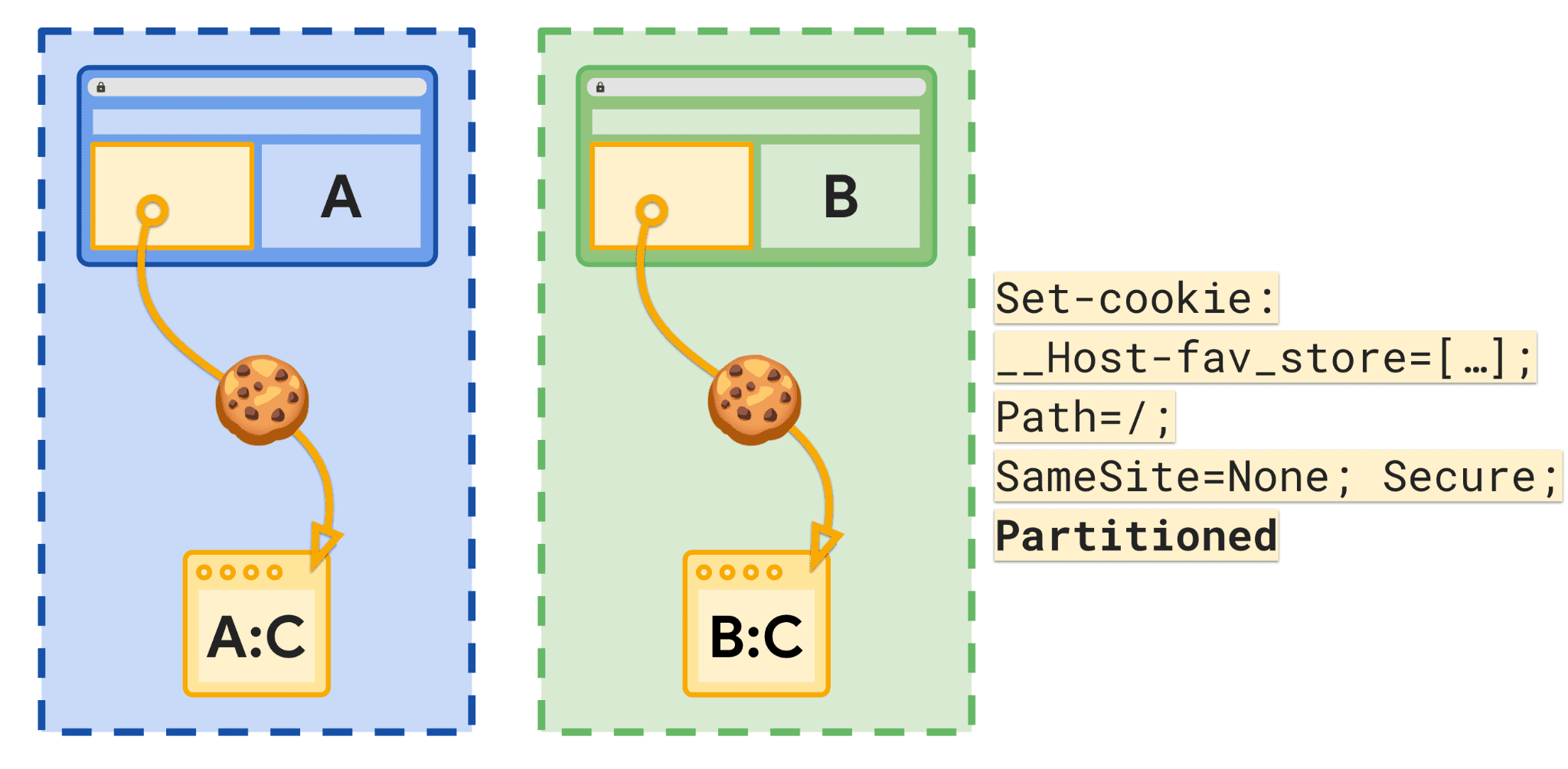
When the user visits a new site, for example site B, site C would not receive the cookie that was set when C was embedded in site A.
Checkout this article for more details about the process to phase out third party cookies.
The Popover API.
With the Popover API it is easier to build transient user interface (UI) elements that are displayed on top of all other web app UI.
These include user-interactive elements like action menus, form element suggestions, content pickers, and teaching UI.
The new popover attribute enables any element to be displayed in the top layer automatically. This means no more worrying about positioning, stacking elements, focus or keyboard interactions for the developer.
This is similar to the <dialog> element, but has several important differences, including light-dismiss behavior, popover interaction management, and event support, and the lack of a "modal" mode.
Checkout this article for more information.
And more!
Of course there’s plenty more.
- DevTools lets you pause and debug C and C++ code in WebAssembly apps with DWARF support.
- The
exclusionFiltersoption innavigator.bluetooth.requestDevice()allows web developers to exclude some devices from the browser picker.. - There is an origin trial for Background Blur.
Official source: Official Chrome update
Installation notes
After downloading the package, confirm that the branch and platform match your device before launching the installer or extracting the archive. If you only need a standard everyday browser, Stable is usually the safest choice. If you are testing new behavior, Beta, Dev, and Canary are better fits.
Related release pages
For newer or older builds in the same branch, open the category archive linked above. For different platforms, use the related desktop archives in the sidebar.
Frequently asked questions
These FAQ blocks help the page read like a complete release article instead of a download stub, which is better for trust and better for SEO.
Should I use this release or stay on Stable?
If you just want the safest everyday browsing experience, Stable is usually the right default. Preview branches are better for testing, compatibility checks, and early feature access.
Why show exact version numbers so prominently?
Because exact-version queries are common in English search behavior, especially for QA teams, enterprise users, and people trying to reproduce a bug or environment.
Why keep a full article around the download buttons?
A stronger page body gives users context and gives Google clearer signals about what the release page actually covers.
Where should older releases live?
Older versions belong in the category archive page, with this article template handling exact-version landing pages one release at a time.