
Download 98.0.4758.102 from the Chrome Stable for Windows 32-bit
Download Google Chrome 98.0.4758.102 with the branch, platform, release date, and file size shown clearly on the same page.
What users usually want to know first
What changed in Chrome 98.0.4758.102
Google Chrome 98.0.4758.102 is available here as part of the Windows 32-bit Stable archive. Use this release page when you want the exact version, the current package details, and quick access to the correct installer.
Opting out of auto-dark themes on Android
In Chrome 96, we started an origin trial for Auto Dark Themes on Android.
With this feature, if your site is light themed and the user’s OS is in dark mode, the browser applies an automatically generated dark theme to your site.
If you've signed up for the origin trial, and you want to opt out of the automatically generated dark theme for a specific page, you can use a meta tag.
Or you can opt-out by setting color-scheme: only light on the :root element.
But the main advantage of this method, is that you can opt out on a per-element basis by applying a specific style to that element.
Check out the How to opt-out of Auto Dark Theme section in Auto Dark Themes on Android for complete details.
COLRv1 font support
In Chrome 98, there’s now support for COLRv1, an evolution of the COLRv0 font format. It adds gradients, compositing and blending, and improved shape reuse for crisp and compact font files that compress well.
A color font makes visual highlights, headlines, and banners really pop out.
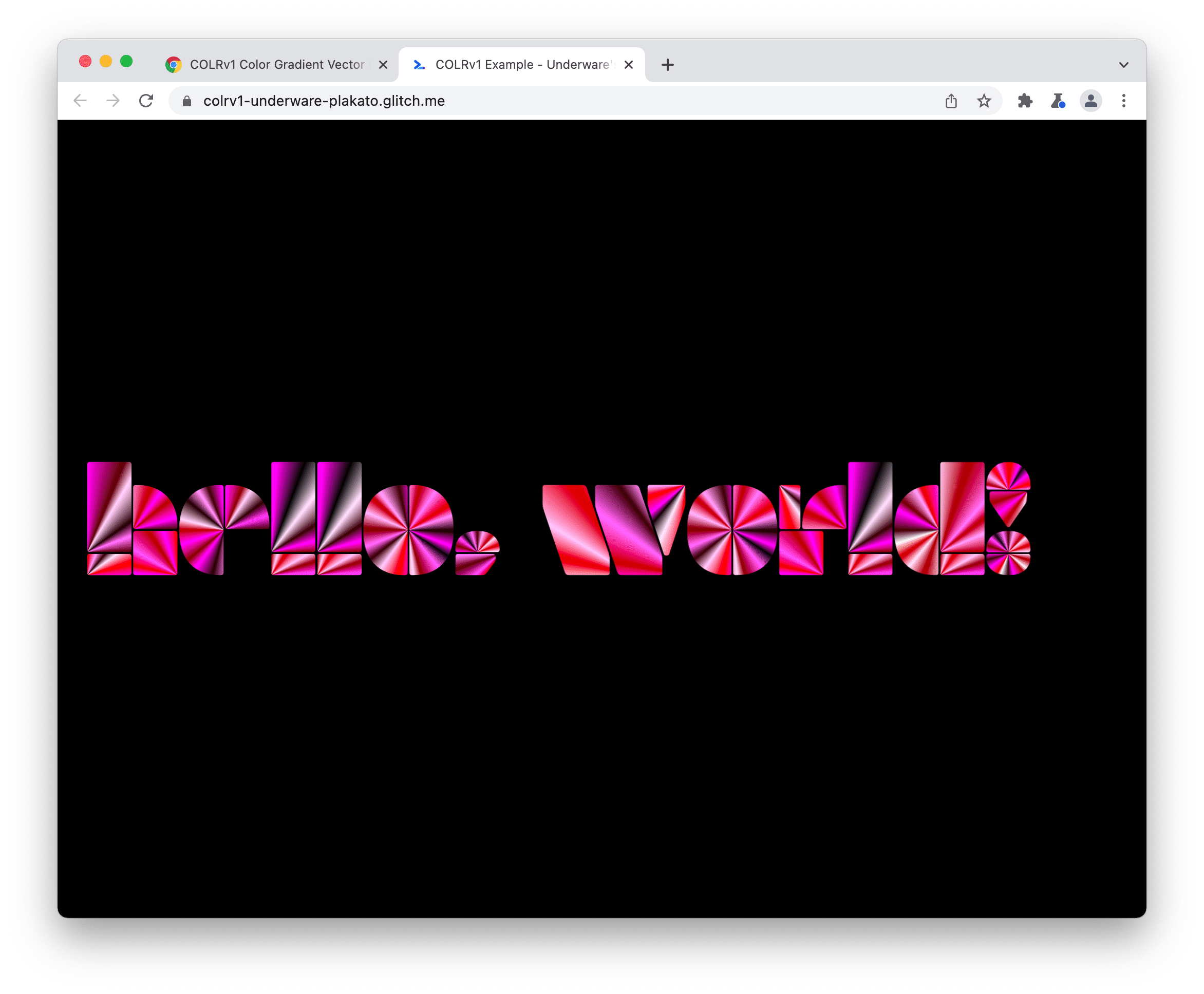
One of my favorite use cases for COLRv1 means consistent emojis across all platforms. You don't need to replace emojis with image files, because font files become smaller, and easier to include on your page.
We’re working on ways to improve feature detection, since it’s not as easy as it should be yet. But this is something to keep an eye on.
Check out COLRv1 Color Gradient Vector Fonts in Chrome 98 for more details and how you can create your own fonts.
Emulate Chrome 100 in the UA string
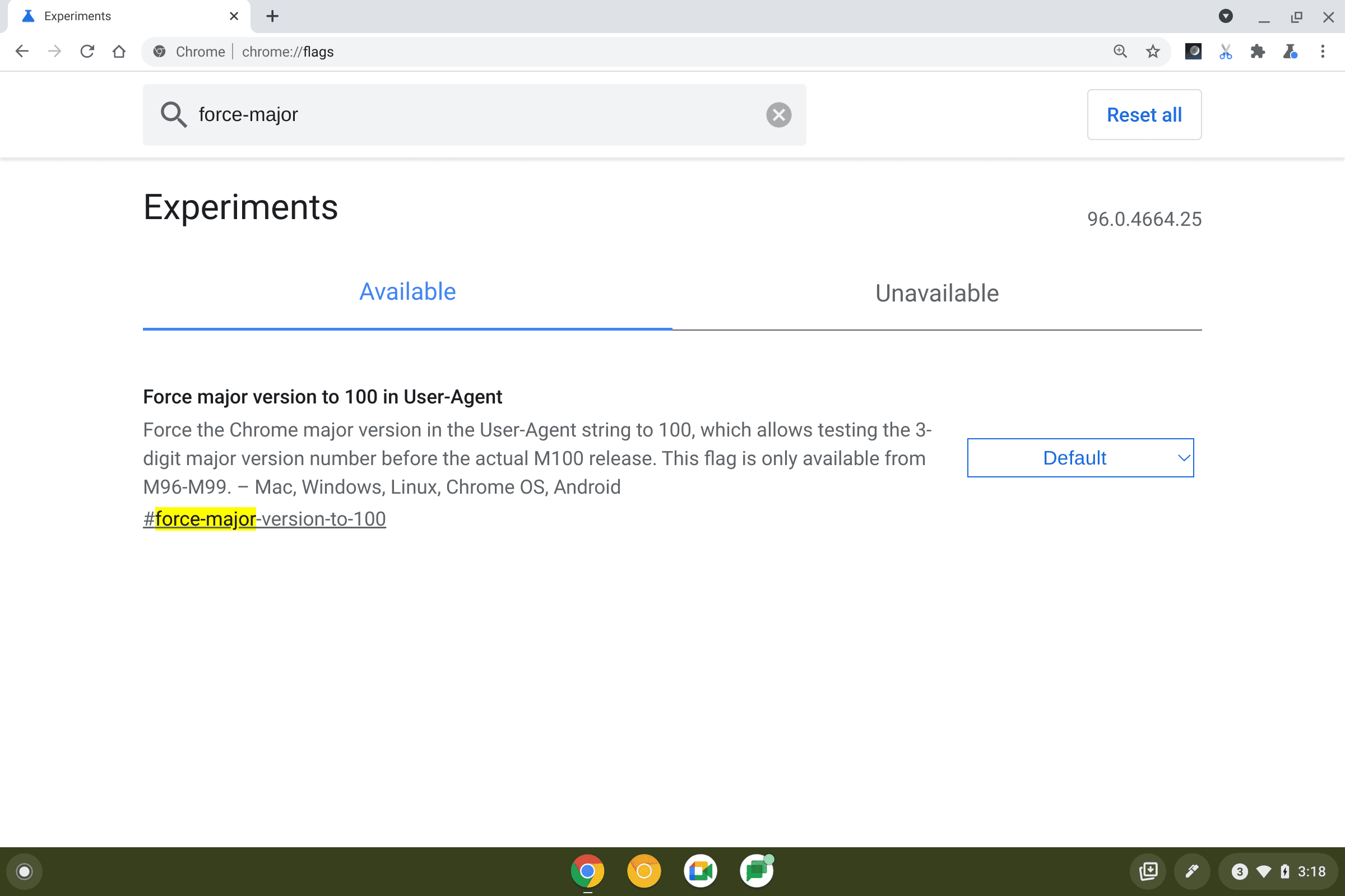
In just a few months, we'll hit Chrome 100, a three digit version number. Any code that checks version numbers, or parses the UA string, should be checked to make sure it handles three digits.
There's a flag called #force-major-version-to-100 that will change the current version number to 100, so you can make sure everything works as expected.
And more!
Of course there's plenty more.
CORS preflight requests are now sent ahead of private network requests for subresources, asking for explicit permission from the target server.
There’s a new origin trial for Region Capture, an API for cropping a self-capture video track. Ideal for screen sharing in video conferencing apps so you don’t create a hall of mirror effect!
Window overlay controls had been planned for Chrome 98, but due to issues found at the last minute, did not make it in. We are still working on it, and expect to see it land in the next few releases.
Official source: Official Chrome update
Installation notes
After downloading the package, confirm that the branch and platform match your device before launching the installer or extracting the archive. If you only need a standard everyday browser, Stable is usually the safest choice. If you are testing new behavior, Beta, Dev, and Canary are better fits.
Related release pages
For newer or older builds in the same branch, open the category archive linked above. For different platforms, use the related desktop archives in the sidebar.
Frequently asked questions
These FAQ blocks help the page read like a complete release article instead of a download stub, which is better for trust and better for SEO.
Should I use this release or stay on Stable?
If you just want the safest everyday browsing experience, Stable is usually the right default. Preview branches are better for testing, compatibility checks, and early feature access.
Why show exact version numbers so prominently?
Because exact-version queries are common in English search behavior, especially for QA teams, enterprise users, and people trying to reproduce a bug or environment.
Why keep a full article around the download buttons?
A stronger page body gives users context and gives Google clearer signals about what the release page actually covers.
Where should older releases live?
Older versions belong in the category archive page, with this article template handling exact-version landing pages one release at a time.